Task Management Spreadsheet
Keep Every Job on Track with a Clear, Organized Task Management Spreadsheet
This free Project Task Management Template helps contractors organize projects, assign work, track progress, and stay ahead of deadlines — all in one simple, structured system. Whether you're managing multiple jobs or coordinating crews on-site, this template gives you full visibility into what’s happening and what needs attention.
What Goes Into Effective Project Task Management?
Strong task management isn’t just a checklist — it’s about clarity, accountability, and timing.
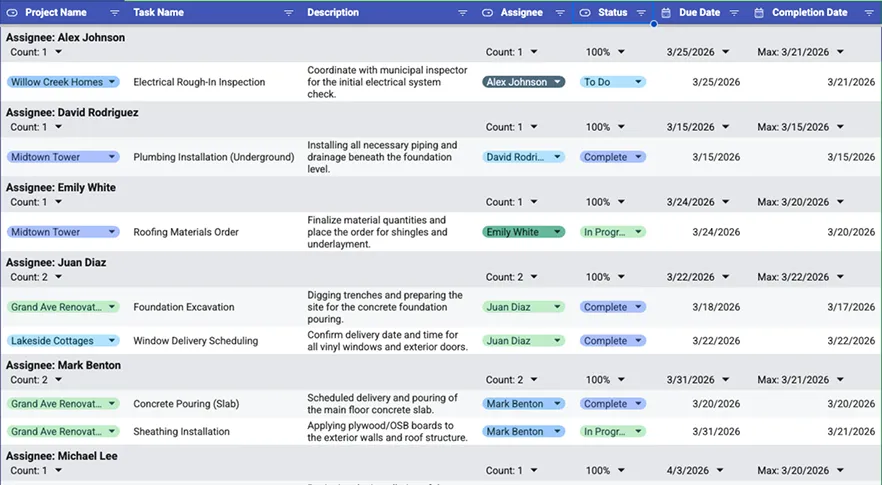
This template helps you track:
- Project name and job grouping
- Task descriptions and scope
- Assigned team members
- Task status (To Do, In Progress, Complete, Blocked)
- Due dates and completion dates
When every task is clearly defined and assigned, your team works faster and with fewer mistakes.

Why Structured Task Tracking Improves Job Execution
Construction projects move quickly, and small miscommunications can create major delays.
Using a structured task management template helps you:
- Keep crews aligned on priorities
- Track progress across multiple jobs
- Identify bottlenecks early
- Ensure accountability across team members
- Reduce missed deadlines
Clear task tracking keeps projects moving forward.

Project Task Management Template Overview
This free Project Task Management Template is delivered as a fully customizable Google Sheets file designed to help you organize, assign, and track tasks across all your projects.
Inside the template, you’ll be able to:
1. Organize Tasks by Project
Group tasks under specific projects so you can manage multiple jobs at once without losing visibility.
2. Assign Responsibility Clearly
Assign each task to a team member so there’s no confusion about who owns what.
3. Track Status in Real Time
Use status labels such as:
- To Do
- In Progress
- Complete
- Blocked
This helps you quickly identify progress and issues.
4. Manage Deadlines and Completion Dates
Set due dates and track actual completion to keep projects on schedule and identify delays.
5. Centralize Project Communication
By keeping all tasks and updates in one place, your team stays aligned without relying on scattered notes or messages.
6. Adapt the Template to Your Workflow
Customize task categories, statuses, and fields to match your project types, team structure, and workflow.
This Project Task Management Template is ideal for:
- General contractors
- Construction project managers
- Field supervisors
- Small to mid-sized construction teams
- Contractors managing multiple jobs simultaneously