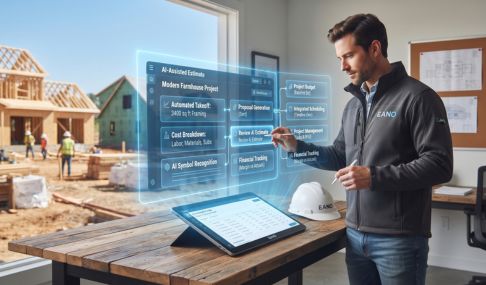

Optimizing Resource Planning Using AI for Construction Estimating Solutions
An idle crew costs money every hour it sits still. An overbooked crew costs money in a different way: overtime, rushed work, missed details, and jobs that start slipping behind schedule.
Both problems often trace back to the same issue. The contractor planned labor and resources around an estimate that didn't accurately reflect what the job would require.
For residential contractors, resource planning doesn't need to mean complicated forecasting software or a dedicated operations team. It starts with knowing the scope, understanding how much labor and material it requires, and turning those numbers into a realistic project schedule.
What Is Resource Planning in Construction?
Construction resource planning is the process of determining what a project will need, when it will need it, and whether those resources will actually be available.
The resources typically include:
- Labor: employees, crews, subcontractors, and specialized trades
- Materials: everything from framing lumber and drywall to fixtures and finishes
- Equipment: owned or rented tools, machinery, dumpsters, lifts, and other jobsite equipment
- Time: the number of working days available and the sequence in which work needs to happen
- Budget: how much has been allocated to each part of the scope
These pieces are interconnected. If drywall takes two days longer than expected, painters may need to be rescheduled. If cabinets arrive a week late, several downstream tasks can move with them. If a project was estimated for 160 labor hours but actually requires 220, both the schedule and the project's margin can suffer.
Good resource planning is ultimately about spotting those problems before they reach the jobsite.
Why the Estimate Is the Foundation of the Schedule
A construction schedule is only as realistic as the assumptions underneath it.
Suppose an addition includes 320 estimated hours of carpentry. If four carpenters are available for roughly 40 hours each per week, that's about two crew-weeks of work before accounting for interruptions, dependencies, inspections, or other projects competing for the same crew.
If the estimate substantially understates those hours, the problem doesn't disappear when the contract is signed. It simply moves downstream.
The contractor may have to:
- Pull workers from another project
- Pay overtime to stay on schedule
- Delay another job's start date
- Bring in additional subcontractors
- Extend equipment or dumpster rentals
- Explain a schedule change to the homeowner
That's why estimating and resource planning shouldn't operate as completely separate processes.
Where AI Can Actually Help
One of the hardest parts of estimating is turning a large scope of work into all the individual tasks, quantities, and costs required to complete it.
AI can reduce some of that repetitive work.
With Eano Pro's AI-assisted estimating, contractors can use AI to help build detailed estimates rather than manually creating every scope line from scratch. Contractors can also use their own cost book, so estimates reflect the pricing structure they actually use.
For projects with blueprints, AI-assisted takeoffs can help extract quantities from plans and move those measurements into the estimating workflow.
That doesn't eliminate the estimator from the process. A contractor still needs to review quantities, labor assumptions, unusual site conditions, subcontractor pricing, and anything else specific to the project.
The advantage is starting with a structured estimate that can be reviewed and adjusted instead of spending hours assembling one manually.

Turning the Estimate Into a Realistic Schedule
Once the scope is defined, the next question is when all that work can realistically happen.
A useful construction schedule needs more than start and completion dates. It should account for dependencies between tasks and the people responsible for completing them.
For example:
Looking at the project this way exposes scheduling conflicts much earlier.
If your carpentry crew is already committed to another job during the framing window, you can move the schedule before promising a start date to the customer. If an inspection slips, you can immediately see which downstream tasks are affected.
Eano Pro can also use AI to help generate project tasks and schedules from the scope, reducing the amount of setup required after a job is sold.
Try the AI task scheduling for free.
Watch Crew Capacity Across Multiple Jobs
Resource planning gets considerably harder when you're running several projects simultaneously.
A schedule might look perfectly reasonable when viewed by itself while being impossible when compared with everything else the company has underway.
Imagine three projects all calling for the same lead carpenter:
Project A: framing Monday through Wednesday
Project B: finish carpentry Wednesday through Friday
Project C: punch work Thursday
Nothing is wrong with any individual schedule. The conflict only becomes obvious when they're viewed together.
This is where moving beyond disconnected spreadsheets and calendars becomes valuable. Project schedules, tasks, and assignments can be managed in the same system, making it easier to see where work is stacking up before the week begins.
Compare Planned Costs With What's Actually Happening
Resource planning shouldn't end when construction begins.
Once work is underway, contractors need to compare the original plan against actual job performance.
If the estimate allocated $20,000 to plumbing, for example, expenses associated with plumbing should roll back up to that part of the scope. If costs begin approaching the budget while significant work remains, that's something the contractor should know before the project is finished.
Eano Pro lets contractors connect expenses to scope items so they can see how actual spending compares with the budget established when the job was sold.
The same principle applies to labor. Crew time tracking provides another signal about whether the assumptions made during estimating are holding up once work reaches the field.
That creates a feedback loop:
Estimate → Schedule → Execute → Track actuals → Improve the next estimate
Over time, that feedback can be more valuable than any generic industry benchmark because it's based on how your own company actually performs.
Common Resource Planning Mistakes
Most resource problems aren't caused by one catastrophic decision. They're usually the result of several small assumptions stacking on top of one another.
The goal isn't to predict every possible problem. Construction has too many variables for that.
The goal is to make the problems you can predict visible early enough to do something about them.
Estimating, Scheduling, and Job Costs Should Work Together
This is where an all-in-one construction management platform has an advantage over separate estimating spreadsheets, scheduling apps, and accounting reports.
Eano Pro connects the workflow from the initial opportunity through estimating, proposals, scheduling, project management, expenses, and job financials.
That means the information created during estimating doesn't have to disappear once the job is sold. The scope can become the foundation for project tasks, schedules, budgets, and cost tracking.
For a small construction company without dedicated estimators, schedulers, and project controls teams, reducing that duplicate work matters. The same information can move through the project instead of being recreated every time the job reaches another stage.
A Simple Resource Planning Workflow for Contractors
You don't need to rebuild your entire operation to improve resource planning. Start with a repeatable process:
- Build a detailed scope. Break the project into enough detail to understand the labor, materials, and subcontractors required.
- Estimate from current costs. Use your cost book and recent project data rather than relying entirely on old templates.
- Translate scope into tasks. Identify the work that needs to happen and its expected duration.
- Add dependencies. Determine what must happen before each task can begin.
- Assign resources. Decide which crews, employees, and subcontractors are responsible.
- Check capacity across projects. Look for overlapping assignments before committing to dates.
- Track actual labor and expenses. Compare what happens in the field with what was estimated.
- Use those actuals on the next estimate. Adjust your assumptions as you learn where jobs consistently run over or under plan.
The result isn't a perfect schedule. It's a schedule based on substantially better information.
Better Resource Planning Starts Before the Job Begins
Contractors don't usually discover resource problems while building an estimate. They discover them weeks later, when two projects need the same crew, a task takes longer than expected, or actual costs start outrunning the budget.
By then, the available solutions tend to be expensive.
Connecting estimating, scheduling, crew assignments, expenses, and job costs gives contractors a better chance of identifying those problems while there's still time to adjust.
That's the real value of better construction resource planning: not eliminating uncertainty, but finding expensive problems while they're still cheap to fix.
Book a demo to see how Eano Pro connects estimating, scheduling, project management, and job financials in one platform.