Construction Management Software With AI Estimating: What Residential GCs Should Look For
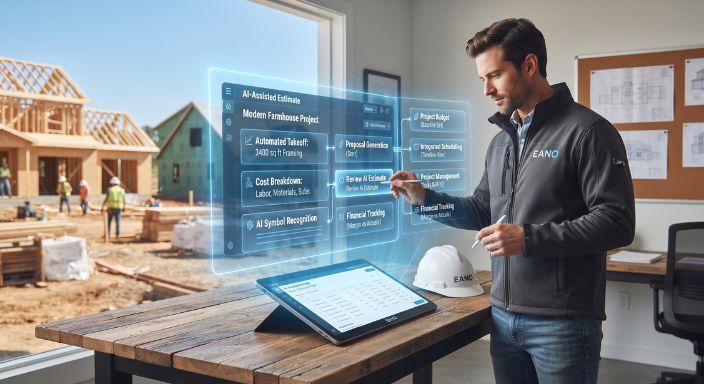
Construction management software with AI estimating should do more than produce a bid faster. For a residential general contractor, the real value comes when the scope and cost information created during estimating can continue into the proposal, project budget, schedule, job-cost tracking, and project execution.
That distinction matters because estimating is only the beginning of the job. An estimate that saves an hour during preconstruction but requires the team to rebuild the same information after the contract is signed has solved only one part of the workflow.
AI Estimating Is One Part of the Construction Management Workflow
Construction estimating software helps contractors calculate expected labor, material, equipment, subcontractor, and other project costs. AI can assist with parts of that process by interpreting project information, organizing scope, generating an initial estimate, or extracting quantities from plans.
The contractor still has to decide whether the result makes sense.
That may mean adjusting labor assumptions for a difficult site, replacing a generic material price with a supplier quote, adding scope that was unclear on the drawings, or accounting for subcontractor pricing and company-specific overhead.
This human review is important beyond construction. The National Institute of Standards and Technology's AI Risk Management Framework notes that organizations using AI need clearly defined roles and responsibilities around human decision-making and oversight. For estimating, the practical interpretation is straightforward: AI can help create the starting point, but the estimator remains responsible for the number that goes to the homeowner.
The more important distinction for a GC is what happens next.
AI estimating is a capability. Construction management is the workflow surrounding it.
A useful system should help information move from:
Lead → Takeoff → Estimate → Proposal → Awarded Job → Budget → Schedule → Project Execution → Actual Costs → Financial Review
That is a much different evaluation standard than asking which software can generate an estimate fastest.
Where AI Can Remove Work From Estimating
Residential estimates involve a surprising amount of administrative work around the actual estimating judgment. Someone has to review drawings and notes, break the project into scope, calculate quantities, organize labor and materials, collect subcontractor pricing, apply overhead and markup, make revisions, and eventually turn the numbers into something presentable to the client.
AI is most useful when it reduces the mechanical work surrounding those decisions without hiding the assumptions the estimator needs to inspect.
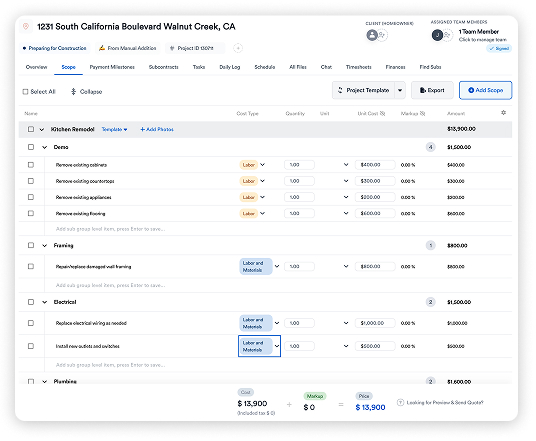
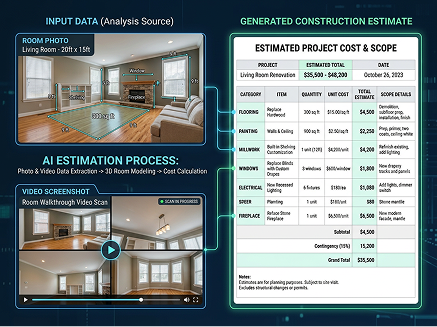
Eano's current platform, for example, supports AI estimates generated from prompts, plans, spreadsheets, PDFs, emails, and other project files. Its AI takeoff workflow is designed to read dimensions, counts, and specifications from plans and organize labor and materials into an estimate.
The important part is not simply that AI produced something. Contractors should be able to review the resulting scope, quantities, pricing, markup, and assumptions before anything reaches the customer.
What to evaluate in an AI estimating workflow
The bottom half of that table is where an estimating application begins to become part of a construction management system.
The Bigger Problem Is Often the Handoff After the Estimate
Consider what happens when estimating sits in a separate system.
A GC completes the takeoff and estimate, creates a proposal, wins the project, and then somebody has to set the job up for production. Cost categories may be copied into a new budget. Scope gets transferred into tasks or a schedule. Client information is entered again. The PM receives a PDF of the estimate and has to interpret what the salesperson intended.
None of those individual steps looks particularly expensive. Across dozens of estimates and active jobs, however, they create recurring administrative work and multiple versions of the same project information.
For a small residential contractor, the person doing that work may be the owner.
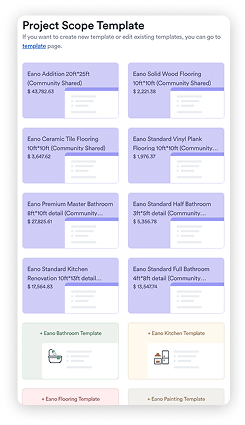
This is where connected construction management software can matter more than another estimating feature. The objective is to preserve the information already created during preconstruction and make it usable downstream.
A disconnected versus connected workflow
The difference is not whether software eliminates every manual step. It is whether the GC repeatedly recreates information that already exists.
What This Looks Like in a Real Contractor Business
Eano's Lighthouse Construction & Design customer story provides a useful example because the problem was broader than estimating.
The Tallahassee custom-home and remodeling contractor had been using multiple construction platforms, including Buildertrend, CoConstruct, ConstructIQ, and Excel. Eano reports that the company was spending roughly $1,500–$2,000 per month across its software stack, while estimating still depended heavily on owner Daniel Lindsey.
After consolidating workflows, Lighthouse used Eano for estimating, proposals, contracts, invoicing, and project management. More importantly from an operations perspective, Daniel's wife was able to take over much of the estimating work.
That is the more interesting data story.
The operational problem was not simply that an estimate took too long. Knowledge and software complexity had made one person a bottleneck. Making the workflow easier to hand off changed who could perform the work, which gave the owner more time in the field. On the company's first end-to-end Eano project, Eano reports that an upper five-figure proposal was electronically signed 1 hour and 58 minutes after being sent.
For another small GC, the takeaway is not that every proposal will close that quickly. It is that software adoption should be judged by what happens to the whole process, including who can use it and how many systems are involved.
The Estimate Should Become the Project's Financial Baseline
Once a client accepts the proposal, the estimate becomes useful for a different reason: it records what the company expected the job to cost when it was sold.
Suppose a remodeling estimate includes $14,000 of framing labor and materials. If that number simply lives inside the original estimating file, the PM has limited ability to use it during production.
If it becomes part of the project budget, the team can compare committed and actual framing costs against the original assumption and investigate the variance.
The National Association of Home Builders defines job costing as tracking costs associated with a specific project and identifies it as an important process for residential builders and remodelers.
This creates a feedback loop:
Estimated cost → Project budget → Committed/actual cost → Variance → Better future estimating
Without that connection, estimating and job costing become separate exercises. The estimator may continue pricing future projects without easily seeing where previous assumptions missed actual field performance.
Scope Changes Test Whether the System Is Truly Connected
The original estimate will rarely remain untouched throughout every residential project.
A homeowner changes tile. Demolition exposes additional damage. A window specification changes. The owner adds built-ins. A subcontractor identifies work that was not visible during the initial site visit.
A connected system should make it possible to trace these changes from the original scope through approval and financial impact.
Eano's MJ Modern Stairways case study illustrates the operational problem. Before implementing Eano, the company handled changes through a mixture of verbal site discussions, notes, emails, separate pricing, approvals, and later invoicing. Eano reports that the company centralized change orders, approvals, and invoicing into one workflow.
This matters because the original estimate is not valuable only on bid day. It establishes the baseline against which additions, deductions, and cost changes can be understood.
How to Evaluate Construction Management Software With AI Estimating
Contractors should resist evaluating software from a feature checklist alone. A product can technically offer estimating, scheduling, and financial tools while still requiring awkward handoffs between them.
A better demo follows one realistic project through the system.
Give the vendor a plan set, inspection report, scope document, or other project information similar to what your company actually receives. Then follow the job beyond the estimate.
This test reveals far more than asking whether the product "has AI."
Where Eano Fits Into This Workflow
Eano positions its platform as residential construction project management software that connects AI estimating and AI takeoffs with CRM, proposals, contracts, scheduling, project management, invoicing, payment milestones, and cost tracking.
That approach is relevant to GCs who want to reduce the number of handoffs between winning and delivering a job.
For example, Eano's SAA Construction Corp. customer story describes a Kansas remodeling contractor that used Eano as its first construction operating system. Owner Esteban Saavedra had previously checked pricing with other contractors and generic AI tools. With Eano, he uses AI to create a starting scope and price, then adjusts the scope, pricing, and markup himself.
That is a useful model for AI estimating: automation prepares work for review rather than making the contractor irrelevant to the decision.
Contractors evaluating Eano's AI estimating workflow or another platform should apply the same standard. Do not stop the demo when the estimate appears on screen. Continue until the project is scheduled, costs can be tracked, and a change to the original scope can be followed through the system.
The Best System Connects Preconstruction to Project Performance
The central question when comparing AI estimating tools is not how impressive the first generated estimate looks.
Ask what happens to that information after the client says yes.
For a residential GC, an estimate contains assumptions about scope, quantities, labor, materials, subcontractors, markup, and expected project economics. Those assumptions remain relevant during purchasing, scheduling, change management, job costing, and closeout.
Construction management software with AI estimating has the opportunity to preserve that chain of information instead of forcing the team to rebuild it at every stage.
The strongest workflow therefore looks less like "AI creates an estimate" and more like:
Project information → AI-assisted estimate → Contractor review → Proposal → Awarded project → Budget → Schedule → Execution → Actual costs → Review
AI may make the first half faster. Connecting the second half is what makes the estimate useful to the rest of the construction business.

.webp)