Integrating Residential Construction Estimating Tools With Project Management Platforms
An estimate that doesn't connect to the project plan isn't really finished — it's a document that has to be manually re-entered somewhere else before the job can start. That gap is where a lot of quiet profit leaks happen.
The leak rarely announces itself. It shows up as a labor hour that got double-counted, a material order placed against the wrong quantity, or a subcontractor cost that never made it from the bid into the budget the project manager is actually tracking against.
Why Integrations Matter for Modern Contractors
Every general contractor knows the pain of double entry: numbers typed once into an estimate, then typed again into a project management tool, with no guarantee the two stay in sync as a job evolves. When those systems are separate, details slip through the gap between them — not because anyone was careless, but because keeping two systems manually aligned is a task nobody has time for on top of running the actual job.
Integrating estimating with project management isn't a convenience feature — it's what makes a single source of truth possible, so costs, schedules, and updates all reference the same numbers instead of three slightly different versions of them.
The alternative — treating estimating and project management as two separate tools connected by manual re-entry — works fine for a single job with a single person managing it. It stops working the moment a business is running several jobs at once, because the re-entry step is exactly where a number quietly diverges from what was actually bid, and nobody notices until the numbers stop reconciling.
This isn't unique to residential contractors — the same double-entry problem shows up in commercial work, in remodeling, in any trade that estimates a job before scheduling it. What makes it particularly costly on the residential side is volume: a residential GC or remodeler is often running more, smaller jobs at once than a commercial contractor managing fewer, larger ones, which means the double-entry tax gets paid more times, on more separate projects, in the same amount of a week.
The re-entry step is also where accountability gets fuzzy. When an estimate and a schedule live in separate systems, a discrepancy between the two doesn't have an obvious owner — was it a data entry mistake, a scope change nobody logged, or a number that was simply never updated after the estimate changed? None of those are unanswerable questions, but answering them takes time that a connected system doesn't require in the first place, because there's only one number to begin with.
Improving Accuracy With Residential Construction Estimating Software
Residential estimating in particular is a moving target — scope changes, price fluctuations, and labor adjustments can throw off even a careful bid within days of it going out. Tools built to bridge estimating and project management directly address that, because an estimate stops being a one-time snapshot and starts being a number that stays current as the job moves.
The practical outcome is fewer surprises for the client and the crew — not because the estimate was more accurate on day one, but because it kept being accurate as things changed.
That distinction is worth sitting with, because it's easy to assume the goal is a more accurate initial number. It isn't, really — no estimate survives contact with an actual job perfectly intact. The goal is an estimate that can absorb the changes that inevitably happen without becoming disconnected from the plan everyone is working from.
Residential work adds a layer most commercial estimating doesn't have to deal with as often: a client who's living through the project, or about to be. A homeowner asking "why did the number change" deserves a clear answer, and that answer is a lot easier to give when the current estimate and the original one are versions of the same document rather than two separate files someone has to compare by hand.
Connecting Estimating to Execution
Once a job is won, the estimate becomes the backbone of the schedule and task list — or it doesn't, and someone has to rebuild that structure by hand from a static document. Integrated tools cut down the manual data entry that introduces errors and make it possible to track profitability as the job actually progresses, not just at the bid stage.
With residential construction estimating tied directly to the project plan, labor, material, and subcontractor costs flow from proposal to kickoff automatically — the estimate a client signed is the same set of numbers the crew is working from on day one.
That continuity is what makes profitability tracking actually meaningful during the job, rather than only at closeout. When the schedule and the budget are built from the same source, a project manager can compare what's actually being spent against what was bid at any point in the job — not just reconcile the two after the fact, when there's nothing left to do about a gap except explain it.
How Eano Pro Handles the Integration
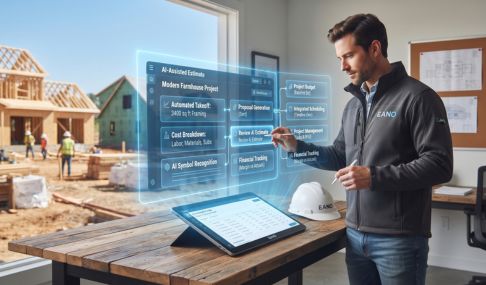
Eano Pro ties estimating and project management together specifically to eliminate duplicate entry, so every estimate is directly connected to the schedule and cost tracking that follows it. In practice, that means real-time updates to estimates and budgets as a job moves, automatic syncing so the team is never working from a stale number, dashboards that show actual costs against the original estimate as they diverge, and QuickBooks syncing to cut down the double-entry that usually happens at the accounting stage. The full list of connections is at Eano Pro's integrations page.
The value isn't the syncing itself — it's catching a budget drifting off track while there's still time to do something about it, instead of finding out at closeout.
The QuickBooks connection specifically addresses a friction point that has nothing to do with construction expertise and everything to do with bookkeeping overhead. Without it, someone on the team — often the owner, on a smaller crew — ends up manually reconciling job costs against the accounting software at the end of every month, a task that's tedious enough that it tends to get pushed back until there's a real backlog. Syncing that data automatically doesn't just save the hours; it means the financial picture of a job is current whenever someone actually needs to look at it, not just once a month when the reconciliation finally happens.
The integration also changes how a change order gets handled. Instead of a change being priced separately and then reconciled against the budget later, it's logged against the same estimate the schedule already references — so the project manager, the client, and the accounting side are all looking at the same updated number as soon as it's approved, rather than three different figures that eventually get sorted out.
Mobile access is part of what makes that connection hold up in practice, not just in theory. A framer flagging a material shortfall from the jobsite, or a project manager approving a change order between site visits, needs the update to land in the same system the office is looking at — not in a text message that someone has to remember to transcribe later. Eano Pro's field updates sync directly into the same estimate and schedule the office sees, so there's no separate step where a phone update becomes an office record.
What to Look for When Evaluating Integration
A few things matter more than a feature list: whether data actually moves between the estimating tool and the project management platform without manual export/import steps, whether change orders and real-time updates keep numbers accurate as a job evolves rather than only at the start, whether reporting makes it easy to compare actual costs against the original estimate, and whether the team can update from a phone on-site rather than needing to be at a desk. Eano Pro was built around those specific requirements, for teams that want less admin overhead and more confidence in the numbers they're looking at.
It's worth actually testing the first claim rather than taking a sales page's word for it. A useful way to check: ask whether a change made in the estimating tool shows up on the project management side without anyone manually triggering a sync. If the answer involves a person clicking "export" and then "import," the two tools aren't really integrated — they're just sitting next to each other.
It's also worth checking how a tool handles the handoff moment itself — the point where a won bid actually becomes an active job. A platform that requires rebuilding the schedule from scratch once a bid is accepted hasn't really solved the integration problem; it's just moved the manual re-entry from one team to another.
One more thing worth testing before committing to a platform: ask what happens to historical estimate data once a job closes out. A tool that only connects estimating and project management while a job is active, but discards the link afterward, loses the ability to compare bid accuracy against actual outcomes over time — which is exactly the data that makes future estimates better. Eano Pro keeps that history connected, so a completed job's actual costs feed back into the historical data future estimates draw from, rather than disappearing into an archive nobody looks at again.
View our roundup of the Top Construction Estimating Software
Where the Time and Money Actually Get Saved
When an estimate and a project plan are actually connected, rework and the errors that come from chasing the "latest version" of a spreadsheet both drop off. In practice: a project manager can see at a glance if a job is drifting off budget, an owner can trust the numbers being reported, and a client gets updates based on what's actually happening rather than a guess. None of that is dramatic on its own — it just adds up to more jobs finishing on time and on budget.
There's a compounding effect across a whole portfolio of jobs, too. A business running five projects at once doesn't just save time on each individual reconciliation — it gets a genuinely reliable view of which jobs are actually profitable and which are quietly eating margin, because the numbers behind that view are consistent across every project instead of assembled differently by whoever happened to be tracking each one.
That portfolio-level view is often the thing a growing contractor didn't know they were missing. It's one thing to know whether an individual job came in on budget; it's another to see, across a dozen jobs, that a particular type of project consistently underperforms its estimate — a pattern that's nearly impossible to spot when each job's numbers live in their own disconnected file, and obvious once they're all measured the same way in one place.
Seamless Onboarding and Support
Getting started doesn't require a steep ramp-up. Eano Pro offers contractor-focused onboarding, with support from people who understand the workflow rather than a generic help desk. Most teams find the switch is less about learning new software and more about no longer having to do a task twice — the estimating process itself doesn't change much, it just stops requiring a second pass into a different system.
Ready to see how integrated estimating and project management could work for your business? Book a demo with Eano Pro today.