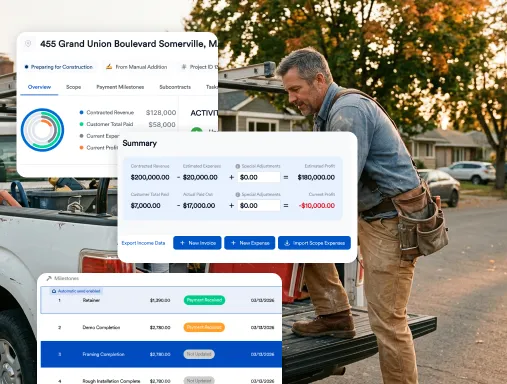
Onboarding Your Team: Seamless Adoption of AI Construction Estimating Platforms
New estimating software rarely fails because of the software. It fails because the team keeps the old spreadsheet open "just in case" and the new tool never becomes the default. This guide lays out a 30-day rollout plan for AI construction estimating: who does what, what to do each week, and what to measure.
Why Change the Way You Estimate?
Time and precision matter on every bid. Traditional estimating eats up hours and leaves plenty of room for costly errors. With tools like Eano Pro, you can simplify the process, reduce manual headaches, and get your team focusing on jobs, not spreadsheets. But the best software is only as good as your team’s buy-in and understanding.
Planning for Smooth Team Adoption
Rolling out new tech doesn’t have to be a hassle. Start by explaining what’s in it for your team: less double-checking, faster turnarounds, and fewer surprises. Bring your estimators and project managers in early—hear their concerns, show them how their day-to-day can get easier, and answer questions up front. With clear expectations and a little upfront training, you’ll see less pushback and faster results.
Getting Started with AI Construction Estimating
A lot of contractors worry that ai construction estimating tools sound complicated. The reality: today’s platforms are designed for real-world jobsites and busy teams. Eano Pro, for example, guides users through fast, step-by-step workflows. That means you spend less time learning software and more time reviewing accurate bids.
Hands-on demos work best. Have your team run a real estimate together. Encourage questions—especially from skeptics. The more familiar they get with the interface, the quicker they’ll see the benefits.
Key Benefits of AI Construction Estimating Platforms
The right estimating software does more than speed up quoting. Here’s what you can expect from a robust ai construction estimating solution:
- Automatic updates with latest materials pricing and local labor rates.
- Easy adjustments for scope changes, alternative materials, or value engineering.
- Better visibility for project managers, owners, and estimators alike.
For a closer look, visit the AI construction estimating page from Eano Pro. See how an integrated approach cuts manual work and supports your team at every step.
Assign Three Roles Before Day One
- Sponsor (usually the owner): sets the date when new estimates must come from the new tool, and sticks to it.
- Champion: one person who learns the tool first, builds templates, and answers day-to-day questions.
- Pilot estimator: the person who will use it most. Their feedback shapes the templates.
A 30-Day Rollout Plan
| Week | Focus | Who | Done when |
|---|---|---|---|
| Week 1 | Load your cost items and build one template for your most common job type | Champion | One template matches how you price that job today |
| Week 1 | Re-create two recent estimates in the new tool and compare totals | Pilot estimator | Differences are explained and fixed |
| Week 2 | All new estimates for that job type go through the new tool. Review every AI draft before sending | Pilot estimator | No spreadsheet estimates for that job type |
| Week 3 | Add the next two job types. Train PMs on how estimates hand off to projects | Champion and PMs | PMs can find the approved scope without asking |
| Week 4 | Review what slowed people down, fix templates, retire the old spreadsheets | Whole team | Old files are archived, not deleted |
If your estimating process isn't written down yet, do that first. Our guide to a simple estimating workflow for contractors is a good starting point, and how growing contractors keep their estimates organized covers templates and naming.
Training and Support: Set Your Crew Up for Success
Even the best tech flops without the right support. Schedule short, focused training sessions—don’t overload your crew all at once. Eano Pro offers built-in tutorials and live support if anyone gets stuck.
Appoint a point person or tech champion on your team to field quick questions. Make it clear that nobody’s expected to be an expert overnight. Regular check-ins help catch snags early, so the whole team stays on track.
Pre-Launch Checklist
- Pick a go-live date and tell the team
- Clean up your price list and remove outdated items
- Write down your markup and contingency rules
- Choose two recent jobs to use as test estimates
- Decide who reviews AI-drafted estimates before they're sent
- Book short training sessions, 30–45 minutes each, instead of one long one
Overcoming Common Hurdles
Some folks may be slow to trust new systems. That’s normal. Highlight how ai construction estimating tools actually make their jobs easier—fewer manual corrections, less pressure to rush, and more confidence in every bid. Get early adopters to share wins with the rest of your crew. Celebrate small milestones, like the first "flawless" estimate or a successful bid turnaround.
What to Measure in the First 30 Days
Pick a few simple numbers and check them weekly. The example targets below are illustrative. Set your own based on where you are today.
| Metric | How to measure it | Example of progress (illustrative) |
|---|---|---|
| Estimate turnaround | Days from site visit to estimate sent | From 5 days to 2 days |
| Adoption | Share of new estimates built in the new tool | From 20% in week 1 to 100% by week 4 |
| Edits per AI draft | How many lines the estimator changes before sending | Falls as templates improve |
| Questions to the champion | Count of "how do I…" questions per week | Drops after week 2 |
Watching edits per AI draft matters. AI estimating speeds up the first draft, but an experienced estimator still decides what the job needs. For an honest look at where AI helps and where it falls short, read what AI construction estimating software gets right and wrong. If your team is worried AI is coming for their jobs, will AI replace construction estimators? is worth sharing.
How Eano Pro Simplifies Onboarding
Eano Pro isn’t just another system—it’s designed for the pace and complexity of real construction projects. Setup is quick, and your data stays secure. The interface is built for non-technical pros, so your crew won’t get bogged down by confusing menus.
Plus, with centralized project management, your estimating, scheduling, and job tracking all live in one place. That means fewer missed details, better communication, and a smoother handoff from bid to build.
Ready to see what smarter estimating could do for your team? Book a demo (opens in a new window) and find out how Eano Pro simplifies every step of the process.
Frequently Asked Questions
AI construction estimating uses software powered by artificial intelligence to automate the creation of project estimates. It analyzes project specs, materials, and labor costs to provide fast and accurate bid proposals.
Start with hands-on demos, include team members in setup, and use short, focused training sessions. Encourage questions and highlight time savings and error reduction early.
- Faster estimate creation
- More accurate bids
- Consistent pricing
- Reduced manual data entry
- Easier updates for scope changes
Eano Pro is built to integrate with other platforms, so you can keep all your workflows connected and reduce double entry.
Most teams can get up and running in a matter of days, thanks to simple setup, interactive tutorials, and live support for any troubleshooting needs.