
How to Manage Multiple Landscape Jobs Without Losing Track
Running a landscape construction company gets complicated quickly when several projects are active at the same time. One crew may be starting demolition while another is waiting on pavers, a third needs an inspection, and a homeowner on another project has just approved a change to the scope. The challenge isn't simply doing the work—it's keeping the schedule, people, materials, costs, and clients coordinated across every job.
Landscape construction management software gives contractors one place to manage those moving parts. Instead of relying on separate spreadsheets, text messages, calendars, and accounting records, contractors can connect estimating, scheduling, project documentation, crew management, expenses, and client communication to the actual project.
For landscape contractors managing larger installations, hardscapes, outdoor living projects, pools, irrigation, or multiple crews, that visibility becomes especially important as the company grows.
According to IBISWorld, the U.S. landscaping industry is projected to top $128 billion in 2024, putting more pressure than ever on contractors to deliver multiple projects on time and on budget.
Too Many Jobs, Not Enough Hours
What Is Landscape Construction Management Software?
Landscape construction management software is a system for managing the business and project workflows involved in building and renovating outdoor spaces. Depending on the platform, that can include leads, estimates, proposals, schedules, crews, subcontractors, daily jobsite updates, expenses, invoices, and project financials.
It is different from software built primarily for recurring lawn care or maintenance routes. A company mowing 300 lawns every month has very different software needs from a contractor managing a $150,000 backyard renovation with demolition, grading, drainage, irrigation, concrete, planting, lighting, and subcontractors.
For landscape construction, the project itself becomes the center of the system. Information collected while estimating the job should ideally remain connected to the project after the contract is signed, so the team doesn't have to recreate the scope, budget, schedule, and client information in separate tools.
How Landscape Construction Management Software Streamlines Daily Operations
Landscape construction management software is designed specifically for the way landscape contracting teams work. By bringing schedules, jobsite photos, client communication, and crew assignments into one digital hub, it cuts down the guesswork and saves time.
Imagine assigning tasks to foremen, updating site progress, or ordering materials—all from a phone or tablet. No more chasing paperwork or searching through email threads. Crew leaders and project managers can see exactly what needs to be done on each site, and office staff can check in on project status without interrupting ongoing work.
When you use a solution like landscape construction management software, everyone stays on the same page. You reduce costly mistakes and deliver better results for your clients.
What Makes Eano Pro Stand Out for Landscape Contractors?
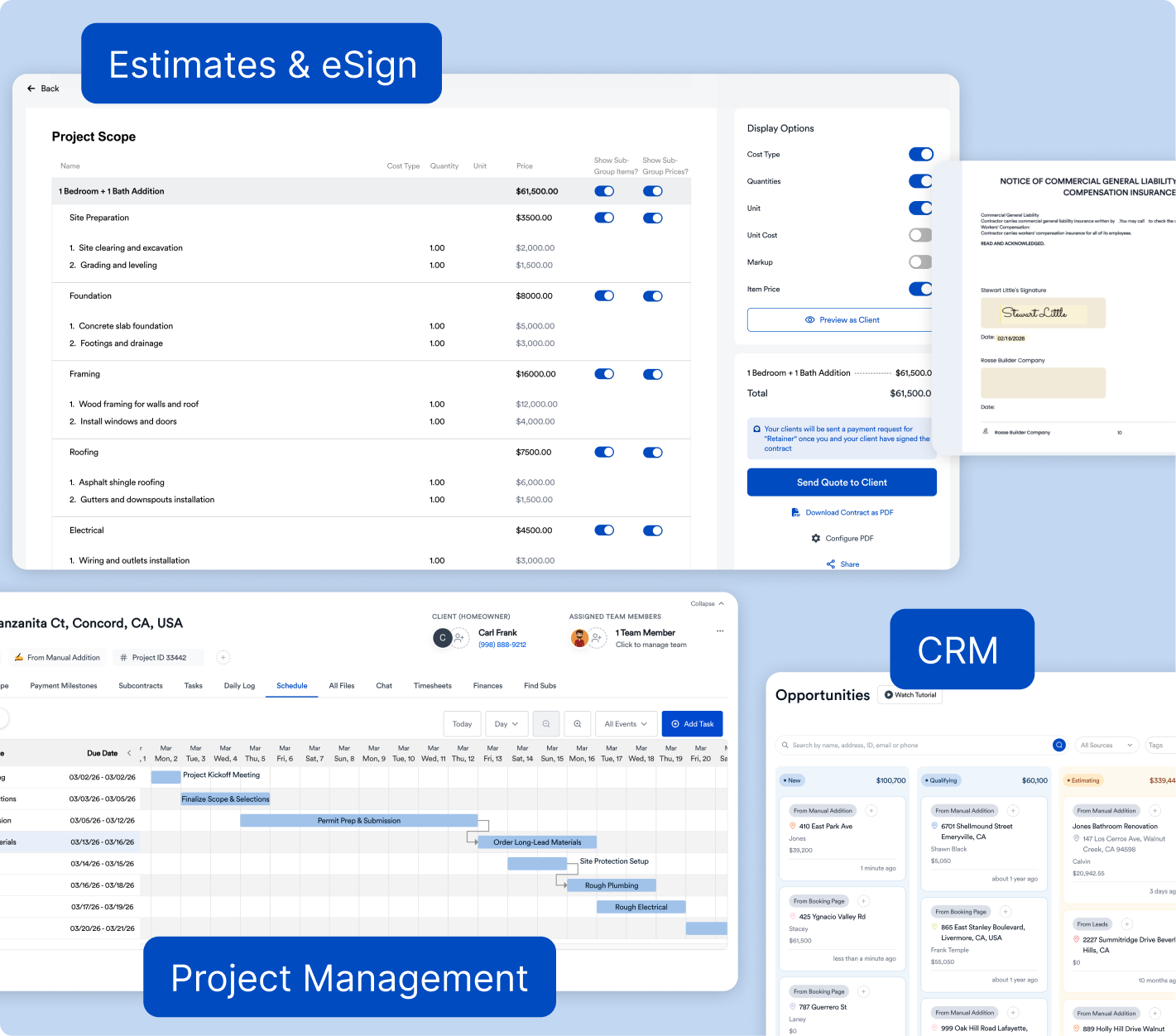
Eano Pro is built for construction companies that manage multiple landscape jobs at once. It combines familiar jobsite processes with simple digital tools. With Eano Pro, you get:
A landscape contractor rarely has just one workflow to manage. A new lead becomes a site visit, the site visit becomes an estimate, the estimate becomes a signed project, and the project creates schedules, labor costs, material purchases, change orders, invoices, and eventually a final job-cost calculation.
Eano Pro brings those workflows together so contractors don't have to maintain separate systems for every stage of the job.
- Estimating and proposals: Build detailed scopes and estimates, apply your own pricing and markup, and send proposals to clients.
- Scheduling: Turn sold work into project schedules and coordinate tasks across multiple active projects.
- Crew time tracking: Capture employee hours so labor costs aren't reconstructed at the end of the week.
- Expenses and job costing: Record project expenses and compare what you're spending against the scope and budget.
- Daily logs and project documentation: Keep jobsite updates, photos, notes, and project history connected to the correct job.
- Change orders and client approvals: Document additional work instead of letting verbal requests disappear into text-message threads.
- Invoices and payments: Carry project financial information through to billing rather than rebuilding it in a separate system.
The advantage isn't simply having more features. It's having the estimate, schedule, field activity, and financial information connected to the same project.
Eano Pro helps you manage multiple projects without adding layers of complexity. The platform is straightforward—no steep learning curve, no overkill features you’ll never use. It’s about cutting down wasted time and making your team more productive.
What Features Should Landscape Contractors Look For?
The right feature set depends on whether you're primarily running maintenance routes or managing construction projects. For landscape construction companies, these are some of the capabilities worth prioritizing:
What Landscape Project Management Looks Like in Practice
Consider a contractor building a complete backyard with a patio, retaining wall, irrigation, lighting, planting, and an outdoor kitchen. That single contract can involve several crews, multiple suppliers, equipment rentals, inspections, and specialty subcontractors.
Before construction begins, the contractor needs a detailed scope and budget. Once the project is sold, that information needs to become a schedule: demolition first, then grading and drainage, underground utilities, hardscape preparation, concrete or pavers, irrigation, planting, lighting, and final punch work.
The office also needs to know what's happening in the field. If excavation takes an extra day because of unexpected soil conditions, that can affect labor costs, equipment rental, material deliveries, and every task scheduled behind it.
This is where construction management software becomes more valuable than a standalone calendar. A schedule change isn't an isolated event—it can have financial, operational, and client implications throughout the project.
Reducing Risks and Boosting Profitability with Landscape Construction Management Software
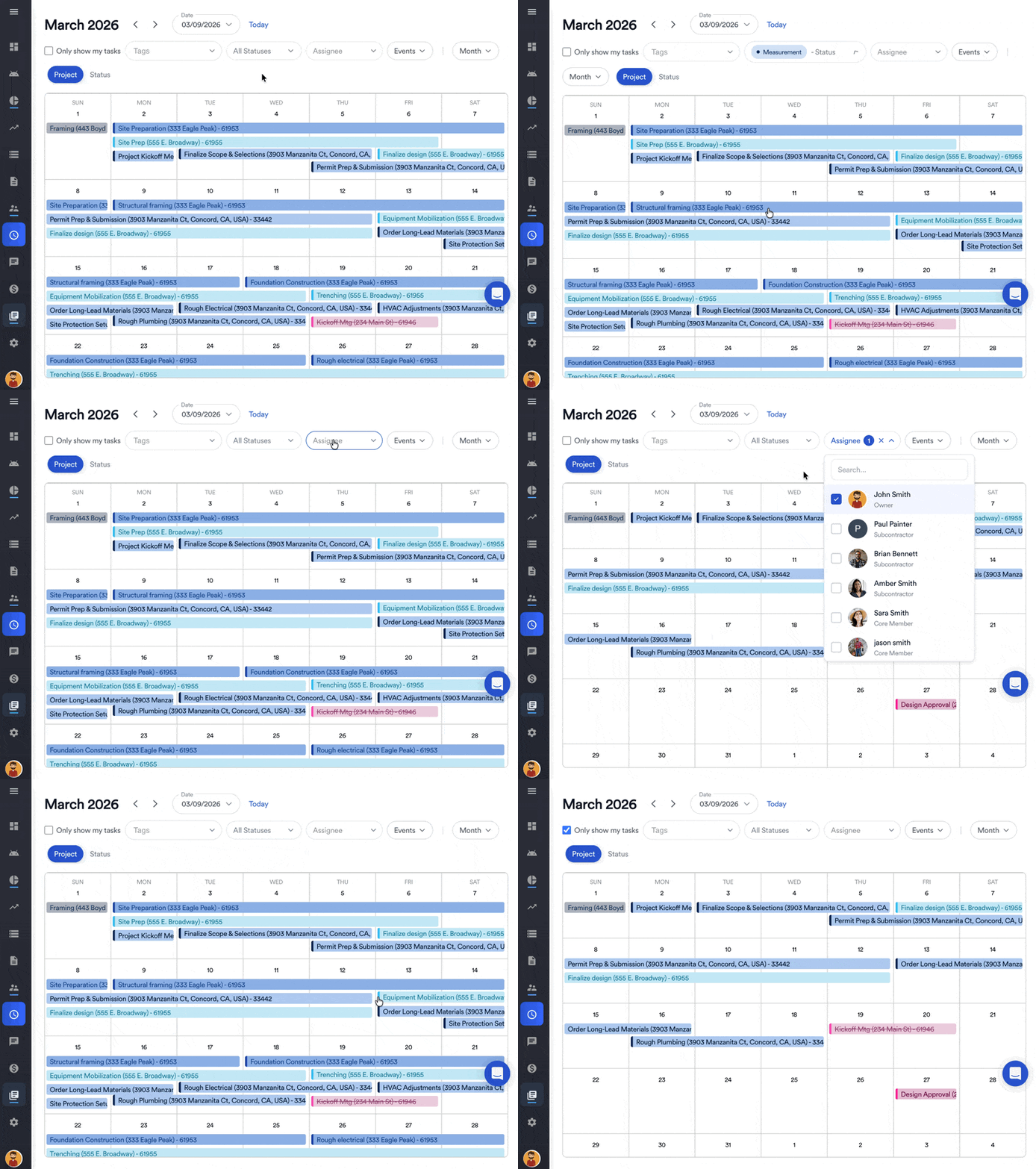
The biggest risk for landscape contractors managing several jobs is losing track of small details—missed deadlines, unapproved change orders, labor overruns. These small issues can turn profitable work into a headache.
Landscape construction management software acts like your digital project coordinator. By keeping schedules updated and communication organized, it helps you spot problems before they cost you money. You can document changes, track approvals, and generate reports in seconds. This means less time chasing paperwork and more time delivering quality work for your clients.
Track the Estimate Against the Actual Job
Scheduling is only half of the problem. A landscape project can finish on time and still be less profitable than expected.
Suppose a retaining wall was estimated with 80 labor hours, a certain quantity of block and base material, equipment rental, and a subcontracted portion of the work. If the crew actually spends 115 hours on it and additional material is purchased halfway through the job, the contractor needs to see that difference while there's still time to react.
That's the purpose of job costing. Instead of looking only at the final bank balance, contractors can compare the original scope and budget with actual labor, materials, subcontractor costs, and other expenses as the project progresses.
This is especially useful when several landscape projects are underway simultaneously. A busy schedule can create the impression that the company is doing well even when one or two jobs are quietly consuming more labor and materials than expected.
Do You Need Landscape-Specific Software?
Not necessarily.
There are platforms built specifically around landscaping, while others are broader construction management systems that work well for landscape contractors performing project-based construction.
The important distinction is often maintenance versus construction.
If most of your revenue comes from recurring mowing, fertilization, route-based maintenance, or other repeat services, software built around routing, recurring visits, and service dispatch may be the better fit.
If your company builds patios, retaining walls, outdoor kitchens, pools, irrigation systems, landscape lighting, or complete outdoor renovations, your workflow starts to look much more like a general contractor's. Estimates become larger and more detailed, projects run for weeks or months, work happens in phases, change orders matter, and tracking actual costs against the original contract becomes increasingly important.
In that case, construction management software may be a better fit than software designed primarily for recurring landscape maintenance.
How to Choose Landscape Construction Management Software
Start with the problems you're trying to solve rather than the longest feature list. Write down how a project moves through your company today, from the first customer inquiry through final payment, and identify where information gets entered twice, lost, or manually transferred between people.
Then test prospective software using a real project. Take a completed landscape job and see whether you can recreate the workflow: build the estimate, create the proposal, turn the sold work into a project, build the schedule, assign work, record field updates, enter expenses, create a change order, and compare actual costs with the original budget.
Pay particular attention to the field experience. Landscape crews aren't sitting at desks all day, so a system that works beautifully in an office but is frustrating from a phone may create more work instead of less.
Finally, consider what happens as you grow. A simple scheduling app might work with one crew and three active jobs, but adding project managers, subcontractors, more simultaneous jobs, and larger contracts usually creates demand for better financial and project visibility.
The best system is the one your office and field teams will actually use—and that gives you a clearer picture of whether every project is on schedule and making money.
Where AI Fits Into Landscape Construction Management
AI is starting to reduce some of the manual setup work inside construction management software. Rather than building every estimate, scope, or schedule from scratch, contractors can increasingly use project information they already have to create a useful starting point.
For example, Eano Pro can use AI to help create estimates and scopes, including estimates based on uploaded project information and construction plans. Once a project is sold, AI can also help turn scope information into project tasks and a preliminary schedule.
The important distinction is that AI shouldn't replace a landscape contractor's judgment about labor productivity, material requirements, sequencing, or pricing. Its value is reducing the repetitive work required to get from raw project information to something the contractor can review and use.
For landscape companies, that could mean spending less office time building the first draft of an estimate or schedule while still keeping the contractor in control of the final numbers and project plan.
Haven't tried AI yet? Just try the AI takeoffs and estimating at for free. Upload landscape plans and describe the project scope.
Bring Your Landscape Projects Into One System
As a landscape construction company grows, the challenge isn't simply finding more work. It's managing more work without losing visibility into schedules, labor, project changes, expenses, and profitability.
The right landscape construction management software gives the office and field teams a shared view of each project while reducing the number of spreadsheets, texts, calendars, and disconnected systems required to run the business.
Eano Pro brings estimating, proposals, scheduling, project management, daily logs, expenses, job costing, invoicing, and other contractor workflows together in one platform. If you're managing multiple landscape construction projects and want to see how those workflows fit together, you can book a demo today.