
From Blueprints to Bids: Choosing the Right Construction Takeoff Software in 2026
Every estimate starts with a takeoff. Before you can price labor, materials, or timelines, you need accurate quantities — square footage, wall lengths, fixture counts, roof measurements, and everything in between. And for many contractors, that process is still one of the slowest and most frustrating parts of bidding.
Manual takeoffs take time. They also introduce risk. A missed measurement, skipped page, or spreadsheet error can quietly throw off an entire estimate and cut into already-tight margins.
That's why more contractors are moving to construction takeoff software. The right platform helps teams measure faster, reduce costly mistakes, and turn plans into estimates without hours of repetitive manual work.
In this guide, we'll break down what construction takeoff software actually does, the different types available in 2026, which features matter most, and how to choose a solution that fits the way your business operates.
Ready to see it in action? Book a free demo with Eano or schedule an appointment at your convenience.
How Construction Takeoffs Work in 2026
Modern construction takeoff software transforms construction drawings into organized quantity data that estimators can immediately use for pricing and proposals. Instead of manually scaling blueprints, highlighting plans, and transferring numbers into spreadsheets, contractors can upload digital plans and generate measurements directly inside the platform.
Most systems support PDFs, scanned drawings, and CAD files, allowing estimators to measure everything from wall linear footage and flooring square footage to roof dimensions, fixture counts, and concrete volumes from a single plan set.
In basic platforms, estimators still perform measurements manually using digital tools. More advanced systems automate much of the process by calculating areas, organizing quantities, and connecting measurements directly to estimating workflows.
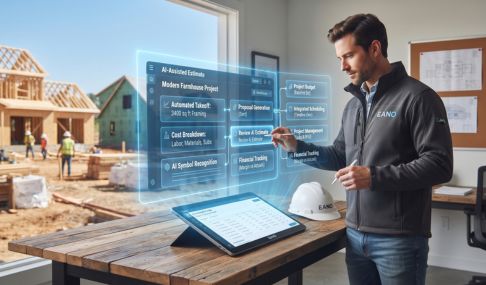
AI-powered takeoff software takes this even further. These platforms can recognize rooms, walls, openings, and other building elements automatically, generating quantity takeoffs with minimal manual tracing. Instead of spending hours clicking through every page, estimators can review, validate, and refine quantities in a fraction of the time.
The result is a faster, more consistent estimating workflow where takeoffs move seamlessly into cost estimates, proposals, and project planning. For a broader look at how takeoffs fit into your overall project workflow, see our guide to best construction management software for general contractors.
The Cost of Manual Takeoffs
For decades, contractors relied on printed plans, scale rulers, colored markers, and spreadsheets to build estimates. That workflow still exists on many projects today — but as bid volume increases and timelines tighten, the limitations of manual takeoffs become harder to ignore.
Time Adds Up Quickly
A detailed takeoff for a mid-size residential project can easily take four to eight hours, especially when estimators also need to organize plan sheets, verify measurements, and transfer quantities into estimating templates. Multiply that across multiple bids each month, and entire workweeks disappear into repetitive measuring tasks.
Small Errors Create Expensive Problems
Manual takeoffs leave room for missed dimensions, duplicated counts, incorrect scales, or overlooked sheets. Even a single inaccurate quantity can affect labor calculations, material costs, markup, and final profitability across the entire estimate. According to the Construction Industry Institute, poor planning and estimating accuracy are among the leading drivers of cost overruns on construction projects.
Growth Becomes Harder to Manage
When takeoff processes live inside personal spreadsheets or estimator-specific workflows, consistency becomes difficult. Reviews take longer, collaboration becomes harder, and scaling estimating operations often means rebuilding processes from scratch.
Construction takeoff software helps eliminate much of that friction. Measurements become faster, quantities are easier to review, and estimating data stays organized in a format the entire team can work from.
Types of Construction Takeoff Software
Not all takeoff tools work the same way. Understanding the main categories helps you pick the right fit.
Digital Planroom / Manual Measurement Tools
These replace your physical scale ruler with a digital one. You still click and measure, but it's on screen. Tools in this category are more accurate than paper and easier to document, but they don't reduce the labor meaningfully. You're still doing every measurement yourself.
Best for: Estimators who want digital documentation but aren't ready for automation.
Semi-Automated Takeoff Software
These tools use templates, assemblies, and drawing overlays to speed up the measurement process. You still interact with the plan, but the software handles unit conversions, area calculations, and quantity rollups automatically.
Best for: Mid-size GCs running mixed project types who want speed without full automation.
AI-Powered Takeoff Software
The most advanced category. These platforms use computer vision and machine learning to read your blueprints and automatically extract quantities — floor areas, wall lengths, opening counts — without requiring you to click every element. What used to take six hours can take under 30 minutes on a typical residential job.
Best for: GCs running multiple bids per month who need to scale their estimating capacity without adding headcount.
Key Features to Look for in Construction Takeoff Software
Before you commit to any platform, evaluate it on these dimensions:
Blueprint compatibility — Can it read your actual drawings? PDF, TIFF, scanned images, and CAD files are common formats. If you're getting hand-drafted plans from architects or older drawings from owners, make sure the tool handles low-resolution scans.
Scale detection — The best tools automatically detect the drawing scale from the title block. Manual scale setting on every page gets old fast, especially on multi-trade plan sets.
Element recognition accuracy — For AI tools, test on one of your own recent project drawings — not a vendor demo. Vendor accuracy numbers always reflect ideal conditions. Your results will depend on your actual drawing quality and project types.
Quantity traceability — Can you click a number in the quantity list and see exactly which element on the drawing it came from? This matters for QA and for client conversations.
Export and integration — Does the quantity output connect to your estimating software, or are you retyping numbers into another system? The best platforms either have estimating built in or offer clean exports.
Collaboration — Can multiple team members access and review a takeoff? If your project manager needs to check quantities or your foreman needs to reference measurements in the field, a cloud-based platform beats a local install.
2026 Construction Takeoff Software Comparison
Accuracy and features vary by project type and drawing quality. Always test with your own drawings before committing.
How AI Is Changing Construction Takeoffs in 2026
The shift from manual to AI-assisted takeoffs isn't a future trend — it's already happening in the field. Here's what's driving it:
Labor pressure — Experienced estimators are harder to find and more expensive to keep. AI takeoff tools let a single estimator handle a volume of work that would have previously required two or three people. The U.S. Bureau of Labor Statistics notes that demand for construction cost estimators continues to grow, making skilled talent harder to source and retain.
Speed-to-bid — In competitive markets, the contractor who responds fastest often wins the initial conversation. AI takeoffs make it possible to turn around a preliminary estimate the same day a set of plans arrives.
Accuracy at scale — Human accuracy degrades across long measurement sessions. A six-hour manual takeoff done on a Friday afternoon carries more error risk than a 20-minute AI-assisted one reviewed fresh on Monday morning.
Integration with estimating — The best platforms don't stop at quantities. They connect takeoff output directly to pricing databases, proposal templates, and project management workflows — so the measurement step becomes one seamless part of a larger system rather than a separate job.
Construction Takeoff Software for Different Trade Types
Takeoff software isn't one-size-fits-all. Here's how accuracy and utility tend to break down by trade:
General Contractors (Residential)
AI takeoff tools perform best here. Single-family homes, remodels, ADUs, and kitchen/bath projects have clear, consistent drawing conventions that AI models read reliably. Expect 90–95% accuracy on well-drawn plans.
Roofing Contractors
Roof area, pitch, and ridge/valley linear footage are well-suited to AI takeoff. Most modern platforms handle standard residential roof geometry well.
Concrete Contractors
Volume calculations from floor plans and structural drawings are increasingly AI-readable. More complex pours with grade changes or custom formwork still benefit from estimator review.
Flooring and Interior Finishes
Room-by-room area takeoffs are among the most reliable use cases for AI. High accuracy on clearly drawn floor plans.
Framing and Structural
Wall linear footage and opening counts are AI-readable. Complex structural details and connection hardware still need manual review.
MEP Trades
Electrical, plumbing, and mechanical takeoffs involve routing decisions and specification details that AI tools are still catching up on. Use AI as a reference for rough quantities; confirm with manual review.
Free Construction Takeoff Software: What's Actually Available
Several platforms offer free tiers or trial periods for takeoff software. Here's an honest look at what free gets you:
Free tiers typically include: Limited project count, basic measurement tools, PDF plan support, and export to CSV or Excel.
Free tiers typically exclude: AI automation, team collaboration, native estimating integration, advanced reporting, and priority support.
Free is a reasonable place to start if you're evaluating whether takeoff software will work for your team. But for production use — especially if you're running five or more bids per month — the time you lose to software limitations will cost more than a subscription.
How Takeoffs Connect to the Rest of Your Estimating Workflow
A takeoff is only the beginning. The quantity list it produces needs to flow into a cost estimate, then into a proposal, then into a project budget. Most contractors manage this process across three to five separate tools or spreadsheets — each one introducing another opportunity for error or delay.
The most efficient approach keeps the entire workflow in one system:
Takeoff → Estimate → Proposal → Project Budget → Client Communication
When those steps happen inside a single platform — like Eano — you eliminate the data transfer work between systems. Quantities from the takeoff pre-populate the estimate. The estimate feeds the proposal. Project costs track against the original estimate automatically. Nothing gets retyped, reformatted, or lost in email.
That's not just a time savings. It's the difference between a business that scales and one that keeps hiring to keep up.
For a deeper look at how to build that end-to-end system, read our guide on best construction management software for general contractors.
What to Look for Before You Buy
Before you sign up for anything, do these three things:
1. Run a test on your own drawings.
Vendor demos always use clean, well-formatted plans. Your projects may have scanned, hand-drafted, or mixed-format drawings. Test on those.
2. Map the workflow downstream.
Where do your quantities go after the takeoff? If your estimating process lives in a spreadsheet, find out how the software exports and whether you'll still be retyping numbers.
3. Calculate the time math.
How many bids per month are you running? How many hours does each takeoff take? Even a 50% reduction in takeoff time has real dollar value when you calculate it against your estimator's hourly rate.
Conclusion: The Takeoff Is Where Winning Bids Start
The contractors who win the most work aren't always the ones with the lowest prices. They're the ones who respond fastest, estimate most confidently, and don't lose hours to processes that should take minutes.
Construction takeoff software is how you get there. Whether you're a solo estimator running 10 bids a month or a team managing a full commercial pipeline, the right tool makes your takeoffs faster, more consistent, and easier to review.
Eano combines AI-powered takeoff with integrated estimating, proposals, and project management — so your quantities become your estimate, your estimate becomes your proposal, and your proposal becomes a tracked project. No reformatting. No data loss. No extra tools.
Ready to see how it works? Book a Demo — Get a personalized walkthrough with an Eano specialist