Construction Estimating Software for Small Businesses: From Spreadsheets to Smarter Bids
Most small contractors already know spreadsheets are slowing them down. The harder part is switching without losing the pricing knowledge built into years of Excel files. This guide is about that move: what to clean up first, how your spreadsheet maps to estimating software, and a simple plan for your first 30 days.
Outgrowing Spreadsheets: Why Change How You Estimate?
Many general contractors start with spreadsheets. It’s familiar, simple, and costs nothing upfront. But as your business grows, manual estimating starts to show its limits. Input errors, forgotten materials, and mismatched formulas can cost you jobs—or eat into your profit.
When you’re bidding on multiple projects, keeping everything straight is a daily headache. You need a way to speed up takeoffs, track costs, and quote confidently—without hiring a back office. That’s where smarter solutions come in.
What Sets Construction Estimating Software for Small Business Apart?
Not every construction estimating tool is made for small teams. Many are bloated or designed for big firms. The best construction estimating software for small business focuses on the basics: make estimating faster, reduce errors, and help you stay competitive on bids.
- Templates built for common jobs and trades
- Real-time cost tracking and labor rates
- Simple change order management
- Easy export to proposals or invoices
These features let you move faster—and with more confidence—from first number to final bid.
Smarter Bids Start With Eano Pro
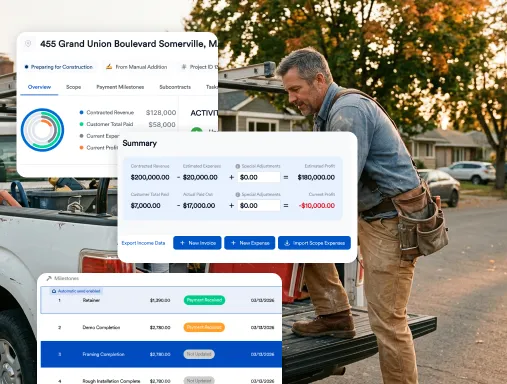
Eano Pro is built for contractors who want to leave the headaches of spreadsheets behind. With its easy-to-use dashboard, you’ll finish estimates in a fraction of the time. Built-in templates mean you don’t have to start from scratch for every job.
No more copy-pasting or double-checking formulas. Eano Pro keeps all your material costs and labor rates up to date. And when you need to adjust a quote, updates flow through automatically, so you’re never working off old data.
You can trust your numbers—and get proposals out the door faster. That’s how you win more work, without working more hours.
Before You Switch: Clean Up Your Spreadsheet
Your spreadsheet holds real value: unit costs, labor rates, and job types you've priced for years. Before moving anything, spend an afternoon on these:
- Pick the three to five job types you bid most often. Those become your first templates.
- Pull your current material and labor prices into one list and delete the outdated ones.
- Write down your markup rules, including any that live only in someone's head.
- Find the lines you add by hand on almost every job, like disposal, protection, or permits, so they become standard template lines.
- Save two or three recent estimates you won and lost. You'll use them to test the new tool.
How Your Spreadsheet Maps to Estimating Software
| In your spreadsheet | In estimating software | Tip |
|---|---|---|
| A copy of last job's file | A saved template per job type | Start with your most common job, not every job |
| A "prices" tab | A cost item library | Update it on a set schedule, such as monthly |
| Markup typed into a cell | Markup rules applied to every estimate | Keep overhead and profit separate |
| Notes column for exclusions | Assumptions and exclusions section on the proposal | Clients should see it, not just your team |
| Copying totals into Word | Proposal generated from the estimate | Check that line detail matches what clients should see |
| File names like "v3-final-FINAL" | Revision history on one estimate | Agree on who can change a sent estimate |
A 5-Step, 30-Day Switch
- Week 1: Build one template for your most common job type and load your cleaned-up price list.
- Week 1: Re-create one estimate you already sent in the spreadsheet. Compare totals line by line.
- Week 2: Send every new estimate for that job type from the software. Keep the spreadsheet read-only for reference.
- Week 3: Add your next two job types as templates and turn your markup rules into settings.
- Week 4: Review what slowed you down, fix the templates, and archive the old spreadsheets.
Example (illustrative)
Picture a three-person remodeling company with separate spreadsheets for baths, kitchens, and decks. In week one they rebuild a recent bath estimate in software and find the spreadsheet left out the haul-off line that the owner usually added by hand. That line goes into the template, so it's on every bath estimate from then on. The point of the test isn't speed. It's finding the gaps the spreadsheet was hiding.
For a side-by-side look at the tradeoffs, read general contractor software vs. spreadsheets. If you aren't ready to switch yet, a structured contractor estimating template is a good middle step. And if your spreadsheet is still holding up, these signs you've outgrown Excel can help you decide when to move.
How Construction Estimating Software for Small Business Pays Off
Accuracy is only part of the story. The real advantage is the time you get back. With construction estimating software for small business, you’ll spend less time tracking down costs or fixing spreadsheet errors. That means more time on the jobsite, meeting with clients, or focusing on quality.
It also helps you spot issues early. When all your costs, margins, and change orders are in one place, it’s easier to see where projects are heading off course. That’s peace of mind you can’t get from a spreadsheet.
See how construction estimating software for small business frees up your team and helps you quote with confidence.
Eano Pro: Practical Solutions for Growing Construction Teams
Eano Pro’s intuitive estimating features are designed for real-world jobs. You don’t need a tech background to get started. Set up job templates, adjust material prices, and generate professional proposals—all in a couple clicks.
You can even manage change orders and revisions directly in the platform. That means less back-and-forth with clients and fewer surprises during the build.
When your estimates are clear and consistent, clients can see the value. It’s a straightforward way to stand out from competitors who are still sending over rough numbers pulled from a spreadsheet.
Once you've switched, the next goal is speed. Our guide on how small construction companies cut estimating time covers where the remaining hours go.
Choosing the Right Construction Estimating Software for Small Business
The best fit is one that matches your workflow and team size. Look for construction estimating software for small business that keeps things simple—no long setup, no steep learning curve.
Eano Pro is designed to get small businesses up and running quickly. You’ll spend less time learning the tool and more time using it to grow your business.
Ready to See Eano Pro in Action?
Stop letting spreadsheets hold your business back. Book a demo today and see how Eano Pro can make estimating simple, accurate, and hassle-free for your team. Schedule your demo now.