
Intro to Construction Estimating Software for General Contractors
Most GC estimates don't go wrong on the big trades. They go wrong on the costs that sit between the trades: weeks of supervision, dumpsters, temporary protection, permits, and the gaps between subcontractor quotes. When those costs are missed, the margin is gone before the job starts.
This guide covers what construction estimating software should do for a general contractor in 2026: how GCs use it day to day, how to price general conditions so they don't fall through the cracks, and a checklist to use while you compare tools.
What Is Construction Estimating Software?
Construction estimating software is a tool designed to help general contractors calculate job costs quickly and accurately. It replaces manual methods—like spreadsheets, paper takeoffs, and disconnected tools—with a system that:
- Standardizes line items and pricing
- Speeds up estimate creation
- Reduces manual math and guesswork
- Connects estimates to real project workflows
Instead of assembling a cost sheet by hand for every job, software lets you reuse templates, store pricing, and maintain consistency across bids.
How General Contractors Use Construction Estimating Software Day to Day
Creating Estimates Faster and More Consistently
Estimating software gives you templates and saved items so you don’t start from scratch every time. You can pull in line items, adjust quantities, and update pricing without rebuilding the whole estimate.
This means you spend less time copying and pasting and more time submitting bids.
Turning Estimates Into Client-Ready Proposals
Most systems let you turn an estimate into a professional proposal quickly. That means you can:
- Share clear scopes and pricing with clients
- Include your terms and conditions
- Offer electronic signing
What used to take hours in Word and PDF tools can now be done in minutes.
Heading Into the Job With Estimates That Stay Connected
In older workflows, once a job was sold, the estimate often disappeared into a folder. Modern estimating software keeps that estimate linked to the project so you and your team always know what was priced and why.
Common Problems With Traditional Estimating Methods
Even experienced GCs struggle with these real issues:
- Estimates take too long to build and often miss cost items
- Pricing changes from job to job because there’s no standard library
- Spreadsheets live in silos and aren’t connected to project teams
- Rework happens when estimates are disconnected from execution
These problems aren’t about skill—they’re about process and tools.
The Cost of Poor Estimating — What the Industry Data Shows
Accurate estimating isn’t a luxury—it’s a business driver. A majority of construction projects go over budget, often by significant margins.¹ When projects exceed their budget, it’s usually because:
- Costs weren’t fully accounted for in the original estimate
- Allowances and contingencies weren’t clearly defined
- Change orders weren’t priced or tracked
- There was no consistent estimating process
Overruns eat into profit, frustrate clients, and put stress on crews. Getting estimates right upfront significantly improves your odds of delivering on time and on budget.
Why Modern Construction Estimating Software Helps Projects Stay on Budget
A better estimating process means better outcomes on jobs:
- Faster turnaround means you can bid more work
- Greater accuracy protects your margins
- Standardized pricing and templates reduce guesswork
- Estimates that stick with the job mean fewer surprises once work starts
At the end of the day, tight estimating doesn’t just win work—it makes sure you make money on the work you win.
How GCs Should Price General Conditions in Estimating Software
General conditions are the job-level costs that don't belong to any one trade. They're easy to forget in a spreadsheet because no sub quote covers them. In estimating software, they belong in a saved section of your template so they show up on every bid and get adjusted for duration and scope.
| General conditions item | How it is usually priced | What to watch |
|---|---|---|
| Site supervision / project management | Per week of job duration | If the schedule grows, this line has to grow with it |
| Dumpsters and haul-off | Per haul or per container | Demo-heavy jobs often need more hauls than expected |
| Temporary protection (floors, dust walls, zip doors) | Lump sum per job | Occupied homes usually need more protection |
| Portable toilet | Per month | Easy to drop when copying an old estimate |
| Permits and plan fees | Per your local fee schedule | Confirm current fees with the jurisdiction for each bid |
| Final and progress cleaning | Lump sum or per visit | Clients judge the whole job by the final clean |
| Equipment and tool rental | Per day or week | Tie rentals to the schedule, not a guess |
Worked example (illustrative numbers)
Here's how general conditions might add up on a 10-week kitchen and primary bath remodel. The numbers below are illustrative only, not benchmarks. Use your own rates and local fees.
| Line | Quantity | Rate (illustrative) | Total |
|---|---|---|---|
| Site supervision | 10 weeks | $900 / week | $9,000 |
| Dumpster hauls | 3 | $550 / haul | $1,650 |
| Temporary protection | 1 | Lump sum | $1,200 |
| Portable toilet | 3 months | $175 / month | $525 |
| Permit and plan fees | 1 | Local fee schedule | $2,400 |
| Final clean | 1 | Lump sum | $800 |
| General conditions total | $15,575 |
On a $180,000 contract, that's about 8.7% of the price. If that section was missing from the template, the bid would be $15,575 short before markup is even applied. For more on what belongs in every bid, see what every contractor should include in an estimate.
Sub bid coverage
The other place GC estimates leak is between subcontractor quotes. One sub includes fixture installation and another doesn't, or nobody priced patching after the electrician. Good estimating software keeps sub quotes attached to the line they cover so you can check scope coverage before you add markup. Our guide to the GC workflow for estimates, subs, and clients goes deeper on that handoff.
Key Features to Look for in Construction Estimating Software
Not all estimating tools are created equal. Here are the features that matter most to general contractors:
Ease of Use
A tool that sits on the shelf because your team doesn’t use it is worse than no tool at all. Look for simple workflows and intuitive interfaces.
Estimate Templates and Job Costing
Being able to reuse line items, assemblies, and job templates saves hours and keeps pricing consistent.
Assisted or AI-Based Estimating
Some modern tools can suggest line items, quantities, or pricing based on what you’ve done before—saving time and reducing errors.
Proposals and E-Signatures
Estimating shouldn’t end with numbers in a spreadsheet. Good software lets you generate proposals and collect signatures quickly.
Client-Facing Dashboards
Sharing a clear view of scope and pricing with clients increases trust and helps close jobs faster.
Accounting Integrations
Connections to tools like QuickBooks keep financial data clean and reduce double entries.
Scalability
Your software should fit where you are today and support you as you take on more jobs and grow your team.
How Eano Pro Supports Construction Estimating for General Contractors
Eano Pro is built for real GC workflows, bringing estimating and job management together in one place:
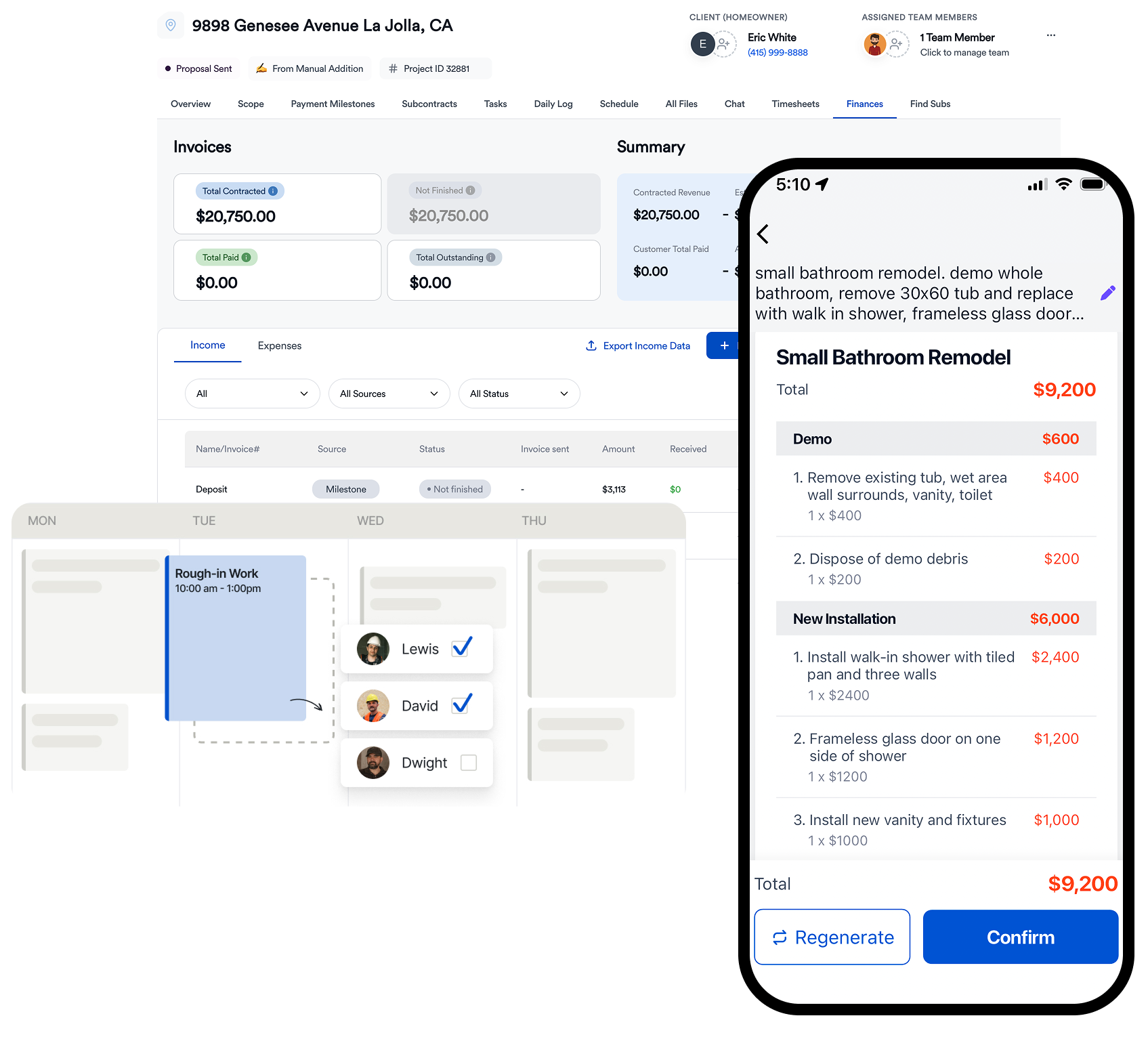
- AI-assisted estimating speeds up cost build-ups so you can bid more work in less time
- Reusable job templates make estimates consistent and repeatable
- Client-ready proposals with e-signatures help you close jobs faster
- Estimates tied directly to the project so teams know what was priced and why
- Designed for teams of any size—from solo GCs to growing crews
Eano focuses on simplicity and real job outcomes, not unnecessary menus and complexity.
Construction Estimating Software vs Spreadsheets
Spreadsheets may work when you’re small, but they break down as you scale:
| Aspect | Spreadsheets | Estimating Software |
|---|---|---|
| Speed | Slow | Fast |
| Accuracy | Manual | Systematic |
| Collaboration | Hard | Built-in |
| Scalability | Limited | Designed to grow |
| Risk of Errors | High | Much lower |
If estimating still lives in a spreadsheet, you’re probably leaving money on the table.
Who Should Use Construction Estimating Software?
Whether you’re a:
- Residential general contractor
- Remodeler
- Custom home builder
- Small commercial contractor
…you’re right for estimating software when:
- You bid multiple jobs per month
- Margins matter to your business
- You want consistent pricing and less admin
2026 Checklist: Estimating Software for General Contractors
Bring a real job you bid recently and check whether the software can:
- Save a general conditions section in your templates and scale it by job duration
- Attach subcontractor quotes to the lines they cover and show inclusions and exclusions
- Apply markup the same way on every bid, with overhead and profit kept separate. If your team mixes up the two, see markup vs. margin for contractors
- Show allowances as their own lines with dollar amounts the client can see
- Turn the estimate into a proposal with e-signature without retyping it
- Carry the approved estimate into the project budget so you can compare estimated and actual costs at closeout, as covered in our guide to construction job costing
- Handle change orders against the original estimate lines
How to Choose the Right Construction Estimating Software for Your Business
Before you choose:
- Think about volume: How many estimates do you generate?
- Consider your team: Will they actually use the tool?
- Look at pricing models: Does it scale with your business?
- Evaluate support and onboarding: Can you get help when needed?
- Plan for growth: Will this system fit you next year and the year after?
Good software should feel like a partner, not a puzzle.
Try Modern Construction Estimating Software
The best way to understand how estimating software fits your business is to see it in action. Book a demo, bring a few job scenarios, and compare how long it would take you today versus with a modern estimating tool.
Eano Pro is one option worth evaluating if you’re ready to tighten estimating, reduce rework, and keep more of the money you earn.
Book a demo and see how fast, AI-powered estimates help you close jobs faster and keep projects on track—without adding complexity for your team.