

Buildertrend Competitors & Alternatives: 4 Construction Software Options Compared (2026)
Last updated: October 2026. Prices checked on each vendor's website in October 2026.
The Top Buildertrend Competitors in 2026 (Quick Answer)
The top Buildertrend competitors and alternatives for residential contractors are Eano Pro, JobTread, Contractor Foreman and Housecall Pro.
- Eano Pro ($159/mo for the Pro plan, see pricing): best for residential GCs and remodelers who want AI estimating, proposals, scheduling and job costing in one easy-to-learn system.
- JobTread ($199/mo plus $20/mo per additional internal user): best for builders who want estimating, budgets and job costing with every feature on one plan.
- Contractor Foreman (from $49/mo billed annually for 1 user): best for budget-conscious contractors who want a wide set of modules at a flat company price.
- Housecall Pro (from $59/mo billed annually): best for home service businesses that run short, dispatch-style jobs rather than multi-month projects.
Buildertrend itself no longer publishes a price. It quotes each company individually after a call.
How we evaluated these Buildertrend alternatives
We compared each platform on the things general contractors tell us matter day to day: how fast you can produce an estimate and proposal, client-facing tools, scheduling, time tracking, job costing, accounting integrations, and how pricing scales as you add users. Prices come from each vendor's own pricing page as of October 2026. Eano Pro is our product, so we've stuck to published facts for the other tools and noted where you should confirm details with the vendor.
Key Takeaways
- Prioritize usability over a long feature list: A platform can promise hundreds of features, but they only create value if you and your team can actually use them without constant training or workarounds.
- Compare value, not just the monthly price: Look at what’s included, which features cost extra, and whether the software can realistically save enough time or improve margins to justify the expense.
- Don’t overlook customer support: Responsive support matters when software is running your estimates, projects, schedules, and finances. Alternatives like Eano Pro put more emphasis on helping contractors get up and running quickly.
- Choose for today without boxing yourself in tomorrow: You don’t need an enterprise-sized system if you’re running a smaller operation, but switching platforms is painful. Look for software that fits your current workflow while giving you room to grow.
Buildertrend is one of the best-known construction management platforms, but that doesn’t automatically make it the right choice for every contractor. Depending on the size of your company, how your team works, and which features you actually use, there may be Buildertrend alternatives that are simpler, more affordable, or better suited to your day-to-day operations.
Eano Pro is one of the strongest Buildertrend alternatives for residential general contractors that want an all-in-one platform with AI built into the workflow. Contractors can create fast AI-powered estimates, AI takeoffs, send professional proposals, manage schedules and tasks, track time and job costs, and give clients a polished experience without piecing together multiple tools.
The goal isn’t simply to find software with the most features. It’s to find a system that helps you sell jobs faster, keep projects organized, understand where your money is going, and reduce the administrative work that eats into your day.
In this updated comparison, we’ll look at four leading Buildertrend competitors: Eano Pro, JobTread, Contractor Foreman, and Housecall Pro. We’ll compare their features, pricing approach, strengths, limitations, and best-fit contractor so you can decide which platform makes the most sense for your business.
New to the platform? Start with what Buildertrend is used for, and see Buildertrend pricing explained for how its plans are structured. Vendor prices change often, so confirm current pricing on each company's website before you decide.
Why Consider Buildertrend Alternatives?
Buildertrend is a robust construction management platform, but it may not be the right fit for every general contractor. When we talk to general contractors, these are some common issues we hear:
- Pricing: Buildertrend’s plans can be costly for smaller teams or solo contractors
- Complexity: Some GCs find its interface overwhelming or difficult to navigate
- Specialization: You may need features tailored to specific trades or project types
- Integration Needs: Buildertrend may not connect with other software you already like and want to keep
What is Buildertrend?

Buildertrend is designed for mid-sized to large contracting businesses that need project management capabilities. It provides end-to-end solutions, from project scheduling and Gantt charts to client communication portals and financial tracking. But its higher price point and learning curve can be barriers for smaller teams or those seeking a more streamlined experience.
Buildertrend Pricing
Custom quote. Buildertrend no longer lists a starting price. Its pricing page asks you to answer a few questions and schedule a call for a tailored quote. The subscription includes unlimited users, and Buildertrend says it is built for builders who "Oversee 5+ projects a year or handle complex, multi-phase builds." If you run fewer, smaller jobs, that’s a good reason to compare the alternatives below.
Alternative 1: Eano Pro

Eano Pro is a next-generation platform designed for general contractors of all sizes. It effortlessly scales with your business from a solo operation all the way up to teams with dozens of employees and hundreds of subcontractors and workers. And it’s as easy to use when you’re juggling 200 projects as when you’re starting out with one at a time.
With Eano Pro you can
- Get access to your data anywhere and everywhere with a full desktop app for your laptop, and a mobile-first interface when you or anyone on your team is on the go
- Track and sell jobs, so you and your team close more deals more quickly
- Save time and avoid mistakes with Eano Pro’s AI-powered estimating system and job templates
- Send professional proposals and sign securely with integrated electronic signing included in every subscription
- Maintain a great relationship with your clients by sharing updates through the Eano Pro client portal
- Get paid quickly, safely, and securely with Eano Pro’s integrated electronic payment system
- Track your team with timesheets, including geofencing to start a shift
- Set and track project schedules, including Gantt charts
- Track and manage subcontractors and subcontracts
- Issue invoices and log expenses
- Sync with systems like QuickBooks to keep accounting happy
- Integrate with Zapier to connect with hundreds of other tools
Eano Pro works with GC business of all shapes and sizes, including:
- Residential renovators
- Kitchen and bathroom renovators
- Whole house renovators
- Custom home builders
- Single-family home builders
- Multi-family home builders
- Small commercial contractors
How much does it cost?
The Eano Pro plan is $159/mo billed annually and covers estimating, proposals, project management, scheduling and job costing. If you only need to create and send estimates, the Estimator plan starts at $25/mo billed annually ($29 month to month), and the Starter plan is $49/mo. You only move up as your team grows and you need more. See Eano Pro pricing for current plan details.
For any plan, Eano Pro offers a no-obligation free trial, so you can try it out for yourself before you buy. And all subscriptions come with one-to-one personalized training sessions, so you get the most out of your subscription.
How does it compare to Buildertrend?
While Buildertrend has many powerful features, it can be expensive and complicated to use. Eano Pro supports the same workflows in an easy-to-use package designed alongside general contractors.
Unlike Buildertrend, Eano Pro is fast, even with thousands of projects, and doesn’t require endless training to figure out. If you do get stuck, all plans include complementary personalized training with a real human.
Pay only for what makes sense for your business, not for every feature or unlimited users even in the smallest plan.
What Eano Pro users have to say:
“It’s the fastest estimating system I’ve ever used. What used to take around an hour now takes about 10 minutes.”
Chris Singh, Project Manager, Creative Construction 360 Inc (Read the story)
“I've had some pretty good software, and this tops it. I've had them all — Buildertrend, CoConstruct, I've had them all. Hands down the best for me right now.”
Daniel Lindsey, Lighthouse Construction & Design (Watch Video)
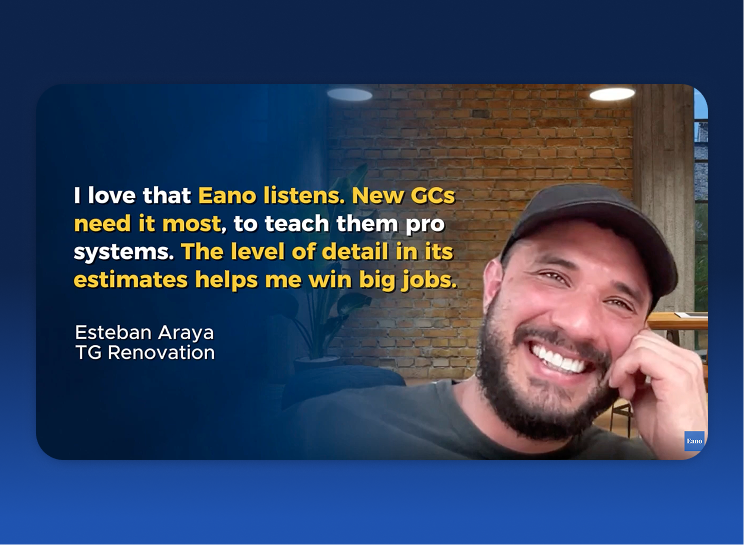
“We were using Buildertrend before. That was it. But — just very boxy. Just a lot, but very little. Just wasn't for us.”
Esteban Araya, TG Renovation (Watch Video)
More Eano Pro switchers
Kyle Samples of Home Truths, a renovation and inspection-repair company, found Eano Pro easier to use than Jobber and Buildertrend:
“I like how the opportunities move through into the projects. It keeps everything organized.” — Kyle Samples, Home Truths
Bill Truong of Driven Construction switched from Houzz Pro, which "lacked robust project management features," and cut quoting time by 30–40%.
Alternative 2: JobTread

JobTread is great for small to mid-sized contractors who want an intuitive, all-in-one platform. It simplifies project management with drag-and-drop scheduling, customizable estimates, and real-time client updates.
Key Features
- Drag-and-drop scheduling
- Customizable estimates and invoices
- Time tracking and payroll integration
- Client portal for real-time updates
Pricing:
$199/mo, which includes 1 internal user, plus $20/mo for each additional internal user (users 2–10). There are no contracts or setup fees, every feature is included, and an annual subscription saves 20%. Customer, vendor and subcontractor portal users are free. JobTread does not offer a free trial; it offers a 30-day money-back guarantee on monthly plans.
Pros of JobTread
- Intuitive interface with minimal training required
- Affordable for smaller teams
- Strong customer support
Cons of JobTread
- Fewer advanced features for large-scale projects
- Limited third-party integrations
Alternative 3: Contractor Foreman

Contractor Foreman strikes a balance between affordability and customization, making it a solid choice for contractors who need flexibility without breaking the bank. The platform offers project management tools, task assignments, and integrations with accounting software like QuickBooks and Xero.
Pricing
From $49/mo billed annually ($588/year) for the Basic plan with 1 user. Annual plans step up to Standard at $105/mo (up to 3 users), Plus at $166/mo (up to 8), Pro at $221/mo (up to 15) and Unlimited at $332/mo. Month-to-month plans start at $139/mo for Standard, since Basic isn't offered monthly. The fee covers the whole company, not each user, and there's a 30-day free trial. Contractor Foreman's pricing page now also lists AI-assisted takeoffs.
Pros
- Budget-friendly, with a company-wide fee instead of per-user pricing
- Customizable workflows
- Strong focus on financial tracking
Cons
- Interface can feel outdated
- Mobile app lacks some desktop features
Alternative 4: Housecall Pro

Housecall Pro is built for contractors who prioritize mobility and automation. It shines with features like automated invoicing, GPS tracking for field teams, and built-in marketing tools to help you grow your business. While it may not be as robust for large-scale project management, its focus on automation and ease of use makes it a favorite for service-focused contractors.
Pricing
From $59/mo billed annually for the Basic plan. Essentials includes 5 users, and MAX includes 8 users plus $35/mo per additional user. There's a 14-day free trial and no long-term contract.
Pros
- Mobile experience for on-the-go teams
- Shorter day-based jobs
- Automated workflows to save time
- Built-in marketing tools
Cons
- Not designed for complicated general contracting project management
- Less suitable for tracking multi-week or multi-month tasks and progress
- Limited customization for complex workflows
Other Buildertrend Alternatives Worth a Look
Depending on your business, a few other names come up often. We haven't scored these in the chart below, so check each vendor's current features and pricing yourself:
- CoConstruct: Buildertrend acquired CoConstruct in 2021, so former CoConstruct users who are evaluating a move are effectively choosing between Buildertrend and an alternative.
- Houzz Pro: combines marketing, lead generation and proposals, aimed mostly at remodelers and designers.
- Procore: built for larger commercial projects and teams. It is often more than a small residential GC needs.
- Knowify: focused on job costing and financial tracking for trade contractors.
If you're coming from a different tool, see our guides to Jobber alternatives, Contractor Foreman alternatives and CompanyCam alternatives. For a broader roundup, see the best construction management software for general contractors.
Switching From Buildertrend: A Migration Checklist
Switching platforms is mostly a workflow change, not a software change. Dodge Construction Network found that among contractors, "87% expect transformation, yet only 19% have adapted workflows" when it comes to AI (Dodge, AI for Contractors; co-produced with software vendor CMiC). Plan the move before you cancel anything:
- Export your data first: client and lead lists, active job details, estimates and cost catalogs, schedules, documents and photos, and open invoices.
- Finish or freeze active jobs: decide which jobs finish in the old system and which move over.
- Rebuild your templates: your most common scopes, assemblies, markups and proposal terms.
- Reconnect accounting: set up your QuickBooks or accounting sync and check that cost codes match.
- Train the field team: timesheets, daily logs and photos are where adoption succeeds or fails.
- Run both systems briefly: overlap for a billing cycle, then switch off the old one.
Good Guys Pools, an Eano Pro customer, reviewed "five or six" platforms before choosing and found each one strong in a different area:
“One was very good in estimation. One was very good in project management on the field. One was very good in the financial side, the QuickBooks integration.” — Dror Iakob, Good Guys Pools
That's why a full-workflow test on your own jobs matters more than a feature list. If you're a general contractor, see how Eano Pro works as general contractor software.
How to Pick the Right Construction Management Software
The best construction management software isn’t necessarily the platform with the longest feature list. It’s the one that fits the way your company actually works, saves your team time, and gives you enough flexibility to grow without paying for a lot of functionality you don’t need.
As you compare Buildertrend and other construction management platforms, focus on these four questions.
How easy is it to use—and will my team actually use it?
Software only works when people use it consistently. If estimators, project managers, office staff, and field crews find a platform confusing or cumbersome, important information eventually ends up back in spreadsheets, text messages, notebooks, and separate apps.
That’s why usability should be one of your first considerations. Look beyond the product demo and think about common daily tasks: How quickly can someone create an estimate, update a schedule, log jobsite activity, find a document, or check the status of a project?
Larger platforms like Buildertrend offer extensive functionality, but that can also mean more setup and a steeper learning curve. Eano Pro takes a more streamlined approach, giving general contractors tools for estimating, proposals, project management, scheduling, time tracking, and financial management within a system designed to be easier to learn and navigate.
Does the pricing make sense as your business grows?
Don’t compare construction software based on the advertised monthly price alone. Consider what you actually get at each price point and what happens when you add employees, projects, or additional features.
The more useful question is: Will this software create enough value to justify what we're spending on it?
That value might come from producing estimates faster, winning more jobs, reducing administrative work, catching budget problems sooner, or eliminating other software subscriptions.
It’s also worth looking closely at how each company's pricing scales. Eano Pro, for example, offers an Estimator plan from $25/mo billed annually for contractors mainly creating and sending estimates, and the full Eano Pro plan is $159/mo. By comparison, JobTread charges $199/mo plus $20 per additional internal user, so a 5-person office team would pay $279/mo on its monthly plan, while Buildertrend quotes each company individually. Contractors can move into more comprehensive plans as they need additional project management and business functionality rather than starting with a larger system from day one.
What kind of support will you get after signing up?
Construction management software touches a lot of your business, so support matters long after the initial setup.
Before choosing a platform, find out what onboarding and training are included, whether personalized help costs extra, and how easy it is to reach someone when your team gets stuck. You should also consider how actively the company listens to contractor feedback when improving the product.
This can be especially important for smaller and growing contractors that don't have someone dedicated to managing software internally. Eano Pro includes personalized onboarding and training and develops its platform alongside feedback from general contractors, so teams can get help adapting the software to their actual workflow.
“What sold me was the hands-on support. I can call Ross anytime, jump on a call with Stella, and we fix things together. I don’t think any other company would take that kind of time to help us.” — IM Contracting
Will the software still fit your business in a few years?
Buying construction management software isn't only about what you need today. Switching systems later can mean migrating customer information, estimates, project records, financial data, templates, and documents—not to mention retraining your entire team.
At the same time, buying far more software than you need because you might grow into it can leave you paying for complexity that provides little immediate value.
Look for a platform that gives you a useful starting point today while letting you add capabilities as your operation becomes more sophisticated. A smaller contractor might initially need estimating and proposals, then add scheduling, job costing, time tracking, financial management, and other workflows as the company takes on more projects.
Eano Pro is designed around that progression, allowing contractors to start with the tools they need and expand into a more complete construction management system as their business grows.
Comparison Chart of Buildertrend Alternatives
| Software | Best for | Starting price (public) |
AI-assisted estimating | Client portal | Time tracking | Task & schedule | Accounting integrations |
|---|---|---|---|---|---|---|---|
|
Eano Pro Top pick Fast estimating + easy adoption |
Residential GCs who want quick, modern estimating plus project workflows that stay simple as the team grows. |
$159/mo Pro plan; Estimator from $25/mo |
Yes AI estimates/quotes |
Yes client dashboard |
Yes timesheets |
Yes tasks + scheduling |
Yes QuickBooks + more |
|
Buildertrend All-in-one (custom quote) |
Mid-sized to larger builders/remodelers who want a broad platform and don’t mind a longer setup/onboarding. |
Custom quote pricing via consultation; unlimited users |
Varies | Yes | Yes | Yes | Yes integrations available |
|
JobTread Small–mid teams |
Contractors who want transparent pricing and strong estimating + job costing + portals. |
$199/mo incl. 1 user; +$20/mo per additional user |
No standard estimating |
Yes | Yes | Yes | Yes |
|
Contractor Foreman Budget-friendly |
Teams that want a lower starting price with lots of modules and customization options. |
From $49/mo billed annually, 1 user |
Yes AI-assisted takeoffs |
Yes | Yes | Yes | Yes QuickBooks + more |
|
Housecall Pro Service contractors |
Field-service businesses that prioritize dispatch, invoicing, and mobile workflows more than full GC project controls. |
From $59/mo billed annually |
No | Yes | Yes | Yes | Yes QuickBooks supported |
Prices as of October 2026; check vendor sites for current plans.
See more comparisons between the two platforms. Comparing takeoff tools too? Read our roundup of Togal AI alternatives.
See how next-generation estimating works in real life
Book a demo and see how fast, AI-powered estimates help you close jobs faster and keep projects on track—without adding complexity for your team.