Best CRM for Construction Companies (2026): Ranked & Compared
The best CRM for a construction company is the one that tracks a lead all the way to a signed, built and paid job without re-typing anything along the way. For most residential contractors, that means a construction suite with CRM built in. For firms that only need a sales pipeline, a general CRM can work.
This guide compares the main options honestly: how we compared them, the two broad types of construction CRM, who each platform fits, and the questions to ask before you buy. If you are still figuring out what a CRM does, start with what CRM stands for in construction.
Disclosure: Eano makes Eano Pro, which appears in this comparison. Descriptions of other platforms reflect their public positioning as of November 2026; check each vendor's site for current features and pricing.
Key takeaways
- Integration is the real differentiator. In JBKnowledge's 2020 ConTech report, 27% of respondents had no phone apps that shared data with each other.
- Two types: general CRMs (strong pipelines, weak on estimates and jobs) and construction suites with CRM (connected from lead to invoice).
- Residential contractors usually need estimates, proposals, e-signature and a client portal tied to the lead.
- Demo with your own data and count every time you re-type something.
Why choosing a construction CRM is different
Finding the right CRM isn't about bells and whistles. It's about what helps your team get work done. Construction companies juggle multiple projects, manage subcontractors and keep clients updated, often from a truck. A CRM designed for retail or SaaS sales stops at "closed won." A contractor's work starts there.
Data integration is the recurring problem. Construction Dive's coverage of the JBKnowledge 2020 ConTech report found that 27% of respondents had no applications on their phones that integrated data between apps, and 49% integrated data manually. Every manual handoff, from CRM to estimate to schedule to invoice, is a chance for a detail to drop.
How we compared
We looked at each platform against the steps a residential contractor actually goes through:
- Lead capture and pipeline: web forms, reminders, pipeline view.
- Estimate to proposal: can a lead become a priced, branded proposal without re-entry?
- E-signature and approvals: proposals, contracts and change orders signed online.
- Client portal: a place for homeowners to see updates, selections and approvals.
- Project continuity: does the record carry into scheduling, daily logs and job costing?
- Accounting: QuickBooks or similar sync.
- Fit for team size: setup effort and who the product is built for.
Two types of construction CRM
| General CRM (e.g. HubSpot, Salesforce, Monday.com) | Construction suite with CRM | |
|---|---|---|
| Pipeline and contacts | Strong, highly customizable | Built for contractor stages |
| Estimates and proposals | Add-ons or integrations | Built in, from the lead |
| E-signature | Often an add-on | Usually built in |
| Change orders and job costing | Not included | Included in most suites |
| Client portal for homeowners | Not typical | Common |
| Setup effort | High: you design the construction workflow | Lower: workflow is pre-built |
| Best for | Firms with a dedicated sales team and separate ops tools | Contractors who want one record from lead to invoice |
Contractors who start with a general tool often end up building their own construction system on top of it. Dilosa Home Service described doing exactly that: "I used Exactimate for insurance claims and built a CRM using Monday.com. But it was a lot of manual work."
The options compared
| Platform | Positioning | Typical fit | Watch for |
|---|---|---|---|
| Eano Pro | CRM, AI estimating, proposals, project management, client portal and change orders in one platform | Residential contractors who want sales and operations connected | Newer brand than some incumbents; confirm the modules you need in a demo |
| Buildertrend | Project management platform for home builders and remodelers, with sales/CRM features | Larger residential builders needing deep project controls | Setup and learning curve; compare plan tiers. See Buildertrend alternatives |
| JobTread | Estimating and job costing focused construction software | Contractors who lead with estimating and job costing | CRM depth relative to dedicated sales tools |
| Houzz Pro | Lead generation, marketing and design presentation for remodelers and designers | Design-build firms that rely on Houzz leads | Project execution tools vs. full PM suites |
| Contractor Foreman | Broad, budget-oriented construction management suite | Cost-conscious contractors who want many features | Depth and polish of individual modules |
| Jobber | Field service management with quoting, scheduling and invoicing | Service and maintenance businesses with short jobs | Fit for multi-month remodels. See Jobber alternatives |
Feature sets change quickly. Treat this table as a shortlist, not a scorecard, and confirm current capabilities and pricing on each vendor's site before deciding.
Who each type fits
Remodelers and custom home builders
Homeowner sales involve site visits, multiple estimate versions, selections and lots of scope changes. A construction suite with built-in proposals, e-signature, change orders and a client portal saves the most time here.
Specialty trades
Pool, roofing, concrete and similar contractors often run high lead volume with standard job types. Fast estimates from templates and automatic follow-ups matter most. Good Guys Pools demoed "five or six" platforms before choosing one (Good Guys Pools story), which is a reasonable shortlist size.
Larger general contractors
Firms with a dedicated sales team and a separate project controls stack may prefer a general CRM integrated with their PM and accounting tools. The trade-off is integration work.
Features to look for, in order of impact
1. Automatic follow-up
Most lost jobs are not lost on price. They are lost to silence: a lead that waited too long for a call back, or a proposal nobody followed up on. Automatic reminders for new leads and sent proposals are the single highest-impact CRM feature for most contractors.
2. Estimate and proposal from the lead
The fastest contractors turn a site visit into a priced proposal the same day. That only happens when the estimate starts from the lead record, with client details, photos and notes already attached. See Eano proposals.
3. Online viewing and e-signature
A proposal the homeowner can open and sign from a phone removes a step that often takes days with PDFs and printers. Our article on client portal proposals explains why it shortens the sales cycle.
4. A client portal after the sale
Once the job signs, the CRM relationship continues. A client portal for photos, updates, selections and approvals keeps homeowners informed and cuts down on calls and texts.
5. Reporting by source and stage
Knowing which lead sources produce signed jobs, and where proposals stall, tells you where to spend marketing money and where your sales process needs work.
Comparing total cost, not just the subscription
Construction software pricing varies widely by plan and team size, so compare total cost rather than headline price:
- Subscription: per user or per company, and which modules each plan includes.
- Add-ons: e-signature, payments, extra users or storage that cost more.
- Other tools you can cancel: a separate estimating app, e-sign tool or project management app.
- Setup time: hours to import data and build templates.
- Admin time saved: re-typing between systems that goes away.
A tool that costs more per month but replaces three others and removes double entry is often cheaper in practice. Eano's plans are listed on the pricing page.
Switching CRMs without losing leads
- Export open leads, proposals and active clients from your current system first.
- Import open opportunities before history. Old closed jobs can follow later.
- Run both systems for a week or two, entering new leads only in the new one.
- Rebuild your proposal templates and follow-up rules before you turn off the old tool.
- Check that lead forms on your website point to the new system.
Why the right CRM makes a difference
When you choose the right CRM, life gets easier for everyone from the office manager to the superintendent. The right system lets you:
- Keep client and subcontractor communication in one place
- Generate proposals quickly and track their status
- Keep a record of every document, call and meeting
- Get real-time alerts when clients have questions
- Follow up on every lead so you never miss new business
- Report on where your jobs and relationships stand
Watch out for "one-stop" claims
Almost every platform says it does everything. The question is whether the modules actually share data. Lighthouse Construction & Design described their experience with a previous tool: "Even though they put it out as a one-stop spot — it was a lot of merging everything that I had." (Lighthouse story)
In a demo, ask the vendor to take one lead all the way through: lead, estimate, proposal, signature, schedule, change order, invoice. Count how many times something is typed twice.
Common mistakes when choosing a construction CRM
- Buying for features you won't use. A long feature list looks good in a demo. Pick the tool that does your five most important steps well.
- Skipping the field test. If your estimator or project manager can't use it from a phone at a site visit, the CRM will only ever hold half the story.
- Ignoring the handoff to operations. Many CRMs are excellent until the job signs. Ask what happens to the lead's notes, photos and estimate once the job starts.
- Underestimating setup. Highly customizable general CRMs can take weeks to shape into a construction workflow. Budget that time or choose a pre-built workflow.
- Not involving the team. The office manager, estimator and at least one field lead should see the demo. They are the people who will keep the data complete.
- Choosing on price alone. The cheapest option can cost more if it means keeping a separate estimating, e-sign and project tool.
A good rule: shortlist two or three platforms, run each with a real lead from last month, and pick the one where that lead becomes a signed proposal fastest with the least re-typing.
How Eano Pro supports construction teams
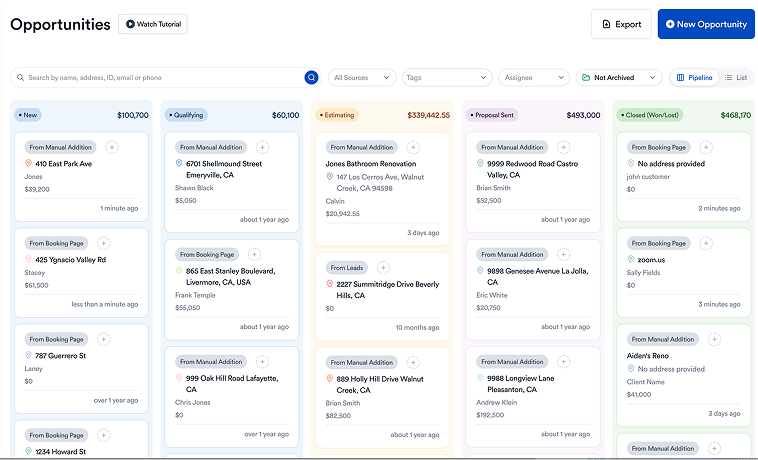
Eano Pro was built with input from contractors who wanted less busywork and more signed jobs. The construction CRM tracks every lead in a pipeline with automatic sales reminders, and each lead turns into an AI-assisted estimate and a branded proposal clients can sign online. After signing, the same record carries into scheduling, daily logs, change orders, budgets and the client portal, with QuickBooks sync for the books.
Crews get mobile access in the field, documents are stored and shared automatically, and dashboards show what matters most to the business.
Key questions to ask before you buy
- Does it connect with the tools you already rely on for estimating, scheduling and accounting?
- Can it automate routine follow-ups so nothing slips through the cracks?
- Can a lead become a proposal and a job without re-typing?
- Can homeowners sign and approve from a phone?
- Is it secure, with access controls for sensitive project data?
- What does it cost for your team size, and what is included in each plan?
- How long will setup take, and who helps?
Final thoughts: invest in a CRM that pays off
The cost of the wrong software is more than the subscription. It's lost bids, missed follow-ups and frustrated teams. Pick the type of CRM that fits how you sell, test it with real leads, and favor the system that keeps one record from first call to final payment.
See Eano's construction CRM or read how contractors use a CRM.