AI Construction Estimating Software: What It Gets Right, What It Gets Wrong
Fifteen years of estimating teaches you to be skeptical of anything that promises to make the job easier. Most shortcuts create problems somewhere else down the line. AI construction estimating software is worth paying attention to — but for a specific reason. It solves one problem extremely well, and if you know exactly what that problem is, you can use these tools without getting burned by what they don't do.
Here's what contractors who've run real bids through these tools actually know — not what the vendor pitch says.
It Solves a Real Problem, Just Not the One You Think
Most contractors hear “AI estimating” and immediately think: faster bids, less overhead, maybe I don’t need as many people. That’s the wrong frame.
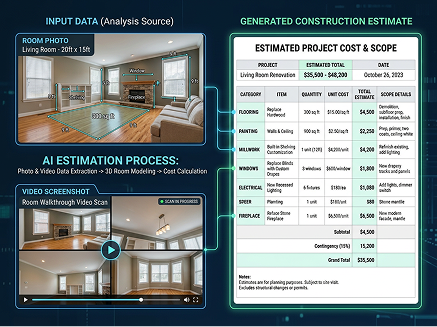
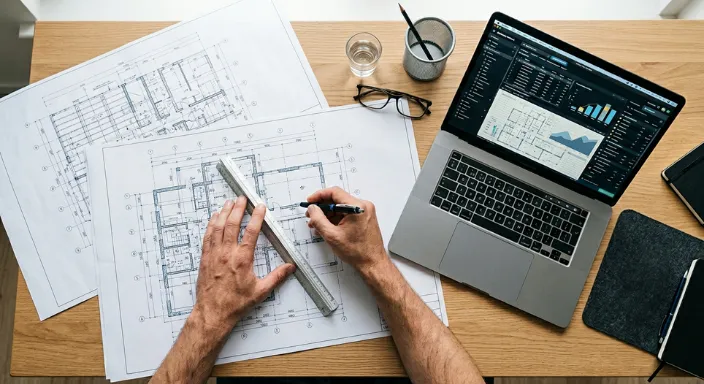
The actual problem these tools solve is measurement time. A solid residential takeoff — walls, openings, floor areas, roof, structural — takes an experienced estimator four to eight hours if they're doing it right. That's before you've applied a single unit cost or made a single scope decision. It's just counting and measuring. AI gets that same measurement done in under an hour on a clean plan set. Sometimes under thirty minutes.
What that means in practice: your estimator stops spending Tuesday measuring and starts spending Tuesday thinking. Reviewing scope, calling subs, checking assumptions, building a number they can actually defend. That's where the value is — not in replacing judgment, but in giving your people more time to use it.
If you're running ten bids a month and each one eats six hours of takeoff time, that's sixty hours a month on measurement alone. Compress that, and you change what's possible for your whole operation — and in a market where 92% of construction firms report difficulty finding qualified workers (Associated General Contractors of America, 2025), getting more output from the people you have matters.
Where It Actually Performs
On residential new construction, additions, remodels, and light commercial work — tenant improvements, small commercial builds under 10,000 square feet — AI estimating software does what the demos say it does, as long as your drawings are clean.
CAD-exported PDFs, proper scale notation, complete plan sets: that's the environment where these tools hit 90–95% accuracy on automated quantity takeoffs. Wall lengths, window and door counts, floor areas, roof surfaces — it reads them fast and reads them consistently. Consistency matters more than most people realize. Your best estimator on a Monday morning measures differently than your newest hire on a Friday afternoon. AI measures the same way every time. When a number is off, you can find it and fix it. When variance comes from five different people making five different judgment calls across fifty bids, tracing that back is a different problem entirely.
The better platforms also let you click any quantity and trace it back to the exact element on the drawing. That's useful internally for review. It's also useful when a client pushes back on scope — you can show your work in seconds instead of reconstructing a spreadsheet from memory.
Where It Falls Apart
Complex commercial and MEP-heavy work. The accuracy drop-off on multi-story commercial, heavy structural, and MEP-intensive projects is real. Mechanical, electrical, and plumbing takeoffs aren't just about reading one drawing — they require cross-referencing architectural, structural, and MEP sheets simultaneously and understanding how they interact. Current AI tools handle basic residential MEP reasonably well. For complex commercial systems — process piping, large HVAC, fire suppression — treat the output as a rough draft and have a senior estimator go through it carefully. The ENR Construction Cost Index is a useful independent benchmark for checking whether quantities and costs are in a realistic range before anything goes into a bid.
Bad drawings break it fast. These tools are trained on clean, CAD-exported construction documents. Hand-drafted plans, low-res scans, PDFs that got printed and scanned back in — accuracy drops at every step. In residential work especially, you don't always get to choose what the architect sends you. Before committing to any platform, test it on the drawings your actual clients actually send. Not the vendor's demo files. Yours. That's the only test that matters.
It won't scope your job for you. This is the one that gets people in trouble most often. AI measures what's drawn. It does not scope what's implied. Temporary protection, demo and debris removal, general conditions, permit coordination, the coordination cost between your plumbing sub and whoever is doing the tile — none of that is on a drawing, so none of it shows up in the output. If you take an AI-generated quantity list and go straight to pricing without adding your full scope, you will underestimate. Every time. Using a division-by-division CSI MasterFormat breakdown as a checklist works well to make sure nothing falls through before a bid goes out.
Scale detection is not consistent across platforms. Mature tools auto-detect drawing scale from the title block and flag anything inconsistent. Less developed tools ask you to set the scale manually, per sheet, on a multi-sheet plan set. On a large set, you can spend an hour of the time you just saved. Ask every vendor you evaluate what happens when scale information is missing or unreadable. The ones that have solved this problem will tell you exactly how. The ones that haven't will change the subject.
How to Evaluate Without Getting Fooled by the Demo
Every demo you see will use clean drawings and simple projects. That's not an accident.
Upload your own drawings. Ask for a trial on your actual recent project files. Whatever your typical clients deliver — clean or messy. If the vendor won't let you do this before signing, walk away.
Compare against a job you already priced. Pick a recent project you estimated manually. Run the same job through the AI tool and compare line by line. The gaps will show you exactly what needs review on your project types. More useful than any published accuracy benchmark.
Test the review process, not just the output. You are going to review every single automated takeoff before it becomes a bid. How easy that is matters as much as how accurate it is. Can you trace any quantity back to the drawing? Can you correct items individually without rebuilding everything? Can you add your general conditions scope cleanly on top of what the AI produced? If the review is painful, the tool gets abandoned — no matter how good the initial output looks.
Watch how quantities get into your estimate. If the answer involves exporting a spreadsheet and re-entering it somewhere else, that's a manual step that costs time and creates errors. The platforms worth building your workflow around connect takeoff directly to the cost application and estimate building. Ask to see it happen live, not just hear about it.
Do the pricing math at volume. Per-takeoff pricing is affordable when you're doing a handful of bids a month. It gets expensive fast. Flat subscriptions flip that equation. Run the numbers at your current volume and at where you're trying to be in two years.
The Platforms Worth Knowing About in 2026
No platform performs the same across all project types. Test before you commit to any of them.
If you need a reliable structure, Eano’s free takeoff template gives you an organized framework designed around the most common residential and light-commercial categories.
Before You Buy, Answer These Three Questions Honestly
What do your drawings actually look like?
Not your best jobs — your average ones. If most of your clients deliver clean CAD exports, you'll get consistent results. If you're regularly working off scanned as-builts or hand-marked PDFs, build more review time into your process and test carefully first.
What's your project mix?
Residential and light commercial with clean drawings is where AI construction estimating software earns its keep. The further you move toward complex commercial, MEP-heavy, or heavily coordinated work, the more your estimator has to add on top of what the software produces.
Does the platform connect your whole workflow?
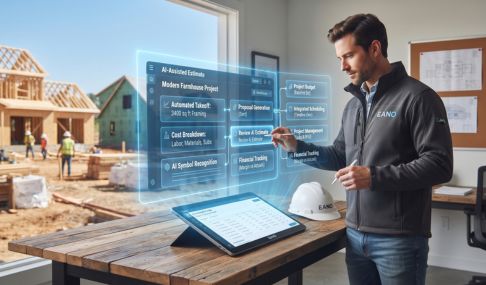
A standalone takeoff tool saves time on one step. A platform that connects automated quantity takeoffs to cost application, estimate building, proposal generation, and client management means your estimator can move from blueprint to signed proposal without touching three separate systems. That's the version worth building around.
Bottom Line
AI construction estimating software is a measurement tool — a fast, consistent one — and it performs well when you know what it's actually for.
Use it on the project types it handles well. Test it on your real drawings before you trust it. Keep your estimator in the loop on the scope.
Done right, it gives your team capacity they didn't have before — more bids, faster turnarounds, better use of the experienced people you already have. That's worth a lot in a market where the jobs worth winning are competitive, and the margin for error is small.