
Topics in this article

Share this post

Why CRM Software for Construction Is Replacing Spreadsheets

John Shum
Sep 5, 2026
3
min read
Construction firms face budget overruns and missed deadlines due to spreadsheet chaos. Adopting CRM software like Eano Pro centralizes data and improves workflow efficiency.

Digging through five open tabs just to find out where a bid stands isn't a workflow — it's a symptom. McKinsey Global Institute has found that large construction projects typically take 20% longer to finish than scheduled and run up to 80% over budget, and poor coordination and lost information are consistently named as root causes.

That statistic describes the industry at large, but the underlying pattern is familiar at almost any scale: information that exists somewhere, in some file, but isn't where the person who needs it is looking.

The Real Cost of Relying on Spreadsheets

For years, spreadsheets have been the default tool for managing leads, clients, and jobs in construction. They're familiar, free, and easy to set up — which is exactly why they stick around long after a firm has outgrown them. A two-person outfit tracking a handful of jobs can run on a spreadsheet just fine. The trouble starts once there's more than one person entering data: two people editing the same file at once, a follow-up date that only lives in someone's head, a bid that got updated in one tab but not the other.

None of those are dramatic failures on their own. What they cost is compounding — a missed callback here, a stale price there, an hour a week spent reconciling which version is current. Add it up over a quarter and it's real money, even before you count the job that got lost because nobody followed up in time.

The version-control problem specifically deserves more attention than it usually gets. "Bids Master Final v3" sitting next to "Bids Master Final v3 (Sarah's copy)" isn't a rare situation — it's close to the default state of a shared spreadsheet once more than one person is actively using it. Whoever opens it next has to guess which one is current, and guessing wrong means quoting a client off a price that's already out of date.

There's also a knowledge problem that spreadsheets make worse over time. The context behind a number — why a bid was priced the way it was, what a client said on a call three weeks ago — rarely makes it into a cell. It lives in someone's memory instead, which means that context leaves the business the moment that person is out sick, on vacation, or moves on to a different job.

What a Purpose-Built CRM Actually Fixes

Construction companies need more than record-keeping — they need everyone working from the same numbers: field crews, office staff, estimators, and project managers. A CRM built for construction is designed around that workflow specifically, rather than adapted from a sales template meant for software or retail.

The concrete difference shows up in three places: every lead and bid deadline gets tracked automatically instead of living in someone's memory; tasks get assigned with visible ownership instead of "someone will handle it"; and updates from the field reach the office in real time instead of at end-of-day.

A generic sales CRM, even a good one, tends to assume a sales cycle that looks nothing like a construction bid. It has fields for "deal stage" and "close date" but no native concept of a site visit, a subcontractor quote, or a permit timeline — which means a construction team using it either leaves half the tool unused or bends it into a shape it wasn't built for. Either way, someone ends up maintaining a workaround, which is the same maintenance burden a spreadsheet has, just wearing a nicer interface.

The three fixes above sound modest individually, but they target the specific places construction leads actually get lost: a bid deadline nobody set a reminder for, a task that was verbally assigned but never written down anywhere, and a field update that sits in a text message until someone happens to check it. None of those failures require a big system to fix — they require a system built around the actual shape of the work, rather than one that assumes a shape construction doesn't have.

Streamlining Your Workflow With Eano Pro
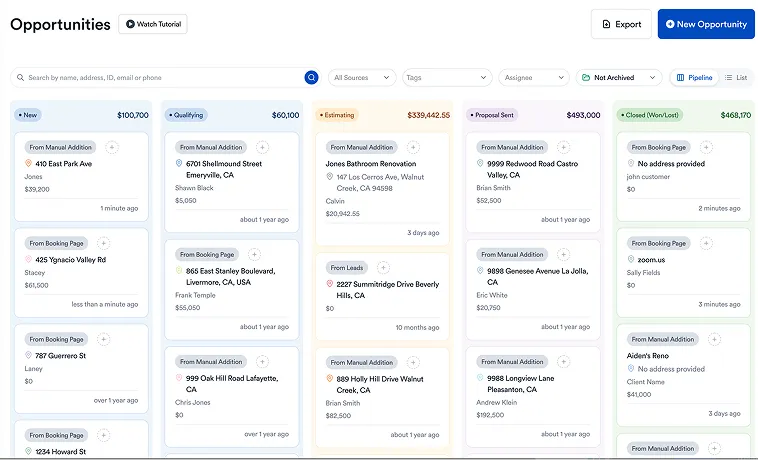
CRM construction lead dashboard
Task / Challenge Spreadsheets Construction CRM
Tracking leads Manual updates make follow-ups easy to miss Leads, stages, and follow-ups stay organized
Managing bid deadlines Dates may live in cells, calendars, or someone's head Deadlines and next actions are visible to the team
Version control Multiple files can create conflicting information One current record acts as the source of truth
Team ownership Hard to tell who's responsible for the next step Tasks and opportunities have clear owners
Client history Emails, texts, notes, and files are scattered Client activity and project context stay together
Field-to-office updates Information can arrive late or get buried Updates are available to the team in one system
Reporting Requires manual sorting and spreadsheet work Pipeline and activity are easier to view at a glance
Scaling the process Gets harder as more people edit and maintain files Built around multiple users, workflows, and permissions

Eano Pro replaces the spreadsheet-and-email juggling act with a single source of truth for sales, job tracking, and client communication. Instead of exporting data between five files to answer "where does this deal stand," the dashboard above shows the full pipeline at a glance — every lead's stage, the next action needed, and who owns it.

From that same dashboard, you can follow up on leads, schedule site visits, and send bids without leaving the system, which is what actually saves the time — not the dashboard itself, but not having to reconstruct context every time you open a new tab.

That context matters more than it might seem from the dashboard alone. A follow-up call goes better when the person making it can see the full history of a lead in ten seconds instead of guessing — the last bid amount, when it was sent, what the client asked about last time. A spreadsheet can technically hold all of that, but only if someone diligently maintained a notes column across every row, every time, which in practice rarely survives more than a few weeks of actual use.

The stage-by-stage view also changes how a sales conversation gets prioritized day to day. Instead of scanning a long list of rows trying to remember which ones are actually urgent, the dashboard surfaces what needs attention now — a bid deadline approaching, a lead that's gone quiet past the point where a check-in makes sense, a follow-up that's overdue. That's the difference between reacting to whatever catches your eye in a spreadsheet and working from a list that's already been sorted by what actually matters today.

What to Actually Look For

Not every CRM built for a "construction" market is built around how contractors actually work. Before switching, it's worth checking three things specifically: whether workflows are customizable to how your business runs bids and jobs, whether the tool integrates with the estimating and project management software you already use, and whether the person who's least comfortable with software on your team can onboard without a training session.

Eano Pro was built around those three answers, which is a deliberate design choice rather than a coincidence — a construction-specific tool that still requires a steep learning curve defeats the point of switching away from a spreadsheet in the first place.

It's also worth asking a more basic question before committing to any switch: who on the team is actually going to use it daily, and does the tool fit how that person already works? A CRM that only the office manager touches doesn't fix the core problem, because the field data that makes the system valuable never makes it in. The tools worth adopting are the ones a busy estimator or project manager will actually open between other tasks, not just the ones with the longest feature list.

How Eano Pro Supports the Switch From Spreadsheets

Moving off a spreadsheet is as much a change management question as it is a software question, and Eano Pro is built with that in mind. Existing leads and job data import directly rather than requiring a manual re-entry project before the tool is even usable — the switch doesn't start with weeks of data cleanup.

The platform also mirrors, rather than replaces, the parts of the spreadsheet workflow that already worked. A team that's used to scanning a list of active jobs still gets that view; it's just backed by live data instead of whatever was typed in last. What changes is what happens automatically in the background — a follow-up reminder that fires on its own, a bid deadline that surfaces without anyone checking a calendar, a lead that moves stages the moment a call is logged rather than waiting for someone to update a cell.

Because Eano Pro connects to the estimating and project management tools a team already uses, the CRM isn't a fourth system competing for attention — it's the layer that keeps sales activity connected to the jobs those leads eventually become, so a closed deal doesn't require someone to manually recreate it in a different tool to actually start the work.

That connection between sales and execution is where a lot of the real value shows up, even though it's the part that's easiest to overlook when comparing tools on a feature list. A closed deal that automatically becomes an active job — with the original bid, client details, and scope already attached — saves the exact re-entry step that a standalone CRM, disconnected from the rest of the business, would still require.

Where CRM Software Outperforms Spreadsheets as You Grow

Spreadsheets don't fail because they're bad tools — they fail because they don't have permissions, audit trails, or automation built in, and none of that matters until a team grows past two or three people. A construction CRM scales past that point by logging every client interaction, assigning clear ownership, and tracking follow-ups automatically. Access control is the other piece that matters more than it seems: with Eano Pro, you decide who can see or edit specific records, so sensitive pricing or client data isn't sitting in a shared file everyone on the team has full access to.

Growth also tends to expose exactly where a spreadsheet-based process was quietly depending on one specific person. A CRM that assigns ownership and tracks activity automatically removes that single point of failure — the business stops depending on one person's memory of where every lead stands.

An audit trail matters more than it seems like it should, right up until it's needed. A dispute over what a client was quoted, a question about when a follow-up was actually sent, a new hire trying to understand the history of an account they just inherited — a spreadsheet answers none of those questions unless someone happened to leave a note in the right cell at the right time. A system that logs activity automatically answers them by default, without anyone having to remember to document anything.

Unlocking Growth and Peace of Mind

Moving off spreadsheets isn't about chasing a trend — it's about removing the specific failure points that cost real money: the missed follow-up, the outdated price on a bid, the deal nobody remembers the status of. Eano Pro brings that into one system so nothing depends on someone remembering to check a file.

The switch itself rarely happens all at once, and it doesn't need to. Most teams run the CRM alongside the spreadsheet for the first few weeks out of habit, then find themselves opening the spreadsheet less and less as trust in the new system builds — not because anyone mandated the change, but because the CRM answers questions faster than the spreadsheet ever did.

If you're ready to see how Eano Pro can help your construction business move beyond spreadsheets, book a demo today: Book a demo.

Get a Personalized Demo

See how Eano Pro can streamline your contracting workflow.

FAQs

Why are spreadsheets problematic for managing construction projects?

Spreadsheets cause errors, version conflicts, missed bids, and wasted time as projects grow.

How does CRM software improve construction project management?

CRM software centralizes communication, tracks leads, automates reminders, and aligns all teams.

What features should I look for in CRM software for construction?

Mobile access, customizable workflows, integration with tools, and simple onboarding are key features.

How does Eano Pro streamline construction workflows compared to spreadsheets?

Eano Pro centralizes sales, job tracking, and communication, reducing data entry and errors.

What advantages does CRM software offer over spreadsheets as construction firms grow?

CRM scales with business, logs interactions, controls access, and ensures predictable workflows.

Recent posts

Free Guide to AI Search

How Contractors Get Found in AI Search

Homeowners are asking ChatGPT and Google AI for a contractor before they ever open a search results page. This guide shows what those answers pull from, and how to make sure your business is in them.